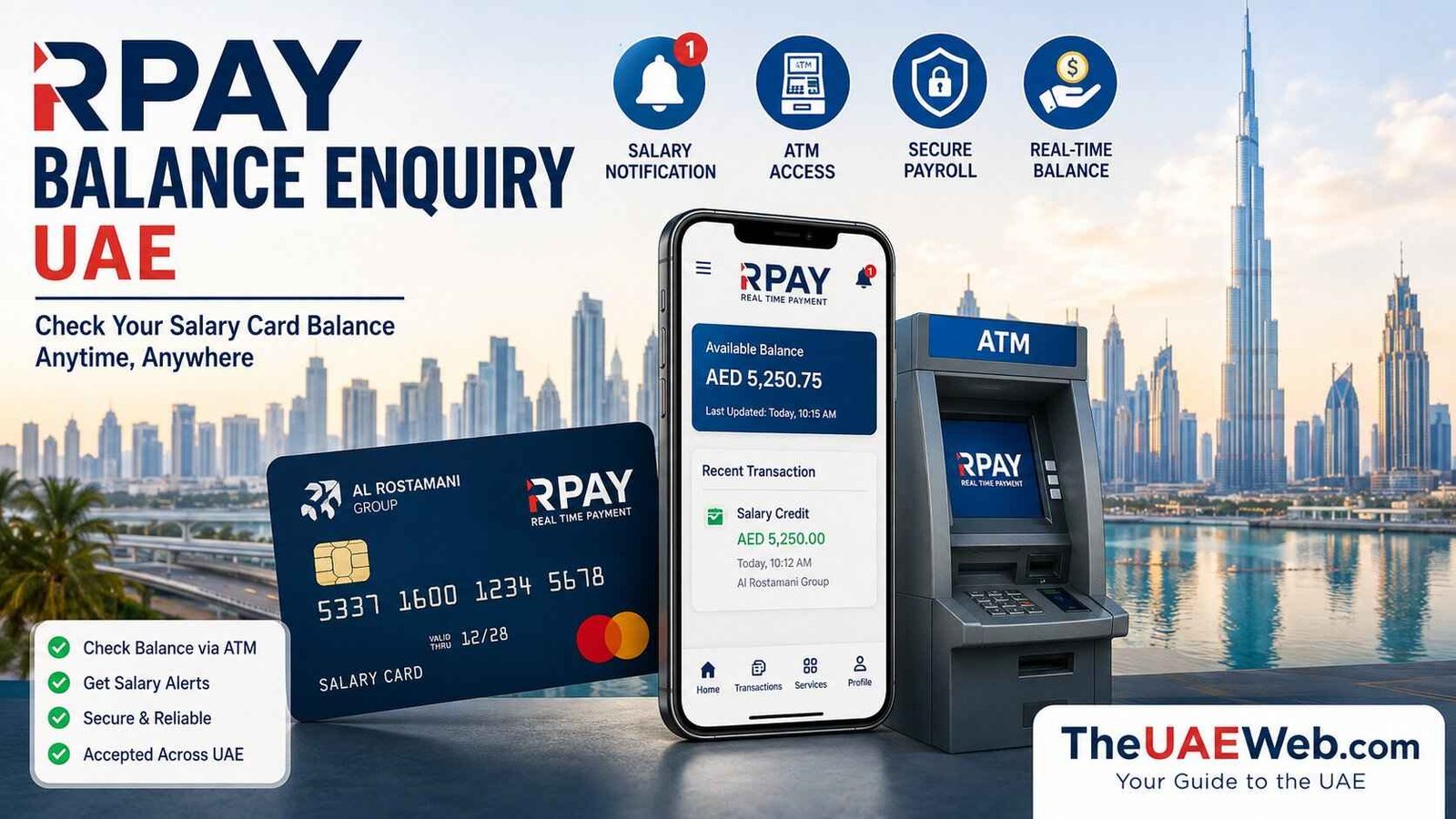
RPay Balance Enquiry UAE 2026: Check Al Rostamani Salary Card Balance Online, App & ATM
Managing your monthly salary becomes much easier when you can check your available balance anytime. Whether you’re waiting for your employer to deposit your salary, planning to withdraw cash, sending money to your family, or simply tracking your spending, knowing your account balance helps you stay in control of your finances.
If you receive your salary through an Al Rostamani Salary Card, the official RPay platform gives you several convenient ways to check your balance without visiting an exchange branch. Using the RPay mobile app, you can instantly view your available balance, confirm salary deposits, review recent transactions, and manage your payroll account directly from your smartphone.
Besides the mobile app, you can also check your salary card balance through compatible ATMs, customer support, and other official Al Rostamani Exchange services.
Need to check your salary balance right now?
Many UAE employees search for questions like:
- How can I check my RPay balance online?
- How do I know if my salary has been credited?
- Can I check my Al Rostamani Salary Card balance without the app?
- Why is my RPay balance showing zero?
- What should I do if my salary hasn’t arrived?
This complete guide from TheUAEWeb.com explains every official RPay balance enquiry method in simple language. You’ll learn how to check your salary card balance step by step, troubleshoot common problems, understand why salary delays happen, and keep your payroll account secure.
What Is RPay?
RPay is the official digital payroll and financial services platform developed by Al Rostamani International Exchange. It is designed primarily for employees who receive their salaries through the UAE Wages Protection System (WPS).
Instead of waiting in long queues at exchange branches or checking your balance at an ATM, RPay allows you to manage your salary directly from your smartphone. Within a few taps, you can confirm whether your salary has been deposited, check your available balance, review previous transactions, and access other payroll-related services.
For thousands of workers across Dubai, Abu Dhabi, Sharjah, Ajman, Ras Al Khaimah, Fujairah, Umm Al Quwain, and other Emirates, RPay has become one of the easiest ways to manage monthly salaries securely.
The platform is available for both Android and iPhone users, making it convenient for employees to access their payroll information anytime and from almost anywhere.
What Is the Al Rostamani Salary Card?
The Al Rostamani Salary Card is a prepaid payroll card issued through Al Rostamani International Exchange. Many companies across the UAE use this card to pay employees under the Wages Protection System (WPS), which ensures salaries are distributed securely and on time.
Unlike a traditional bank account, the salary card allows employees to receive their wages electronically without opening a personal bank account.
Once your employer deposits your monthly salary, you can use the card to:
- Withdraw cash from compatible ATMs across the UAE.
- Pay for shopping at supermarkets, restaurants, and retail stores.
- Check your available salary balance.
- View recent transactions.
- Transfer money through supported services.
- Monitor monthly salary payments.
For many expatriate workers, the Al Rostamani Salary Card provides a safe, convenient, and reliable way to receive and manage their income.
Why Should You Check Your RPay Balance Regularly?
Checking your RPay balance regularly does much more than show how much money is available in your account. It helps you confirm that your salary has been deposited on time, track your daily spending, detect unauthorized transactions, and avoid payment failures when shopping or withdrawing cash.
Many employees across the UAE check their RPay balance immediately after payday to make sure their employer has successfully transferred their salary through the UAE Wages Protection System (WPS). It only takes a few moments and can save you from unnecessary stress if there’s a payroll delay.
Making balance checks part of your monthly routine also gives you a better understanding of your finances, helping you budget more effectively and avoid unexpected surprises.
Some of the main benefits include:
- Confirm your monthly salary has been credited.
- Check your available balance before withdrawing cash.
- Monitor your spending throughout the month.
- Review recent salary deposits and transactions.
- Detect suspicious or unauthorized activity early.
- Plan money transfers and bill payments with confidence.
Whether you receive your salary weekly or monthly, checking your balance regularly is one of the easiest ways to stay in control of your finances.
Method 1: Check RPay Balance Online Using the RPay App
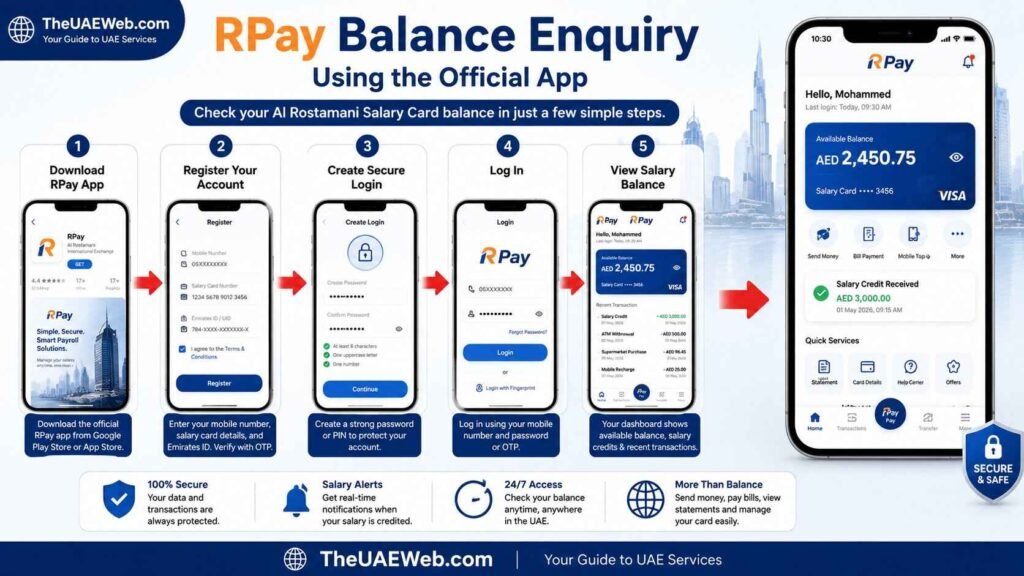
The easiest and fastest way to perform an RPay balance enquiry is through the official RPay mobile application. Once your account has been registered, you can check your salary balance anytime without visiting an exchange branch or ATM.
Besides displaying your available balance, the app also lets you review salary credits, transaction history, money transfers, and other payroll-related services from one secure dashboard.
Before You Start
Before checking your balance, make sure you have:
- Your Al Rostamani Salary Card.
- A smartphone with internet access.
- The official RPay app installed.
- Your registered mobile number.
- Login PIN or password.
For your security, always download the official RPay application from the Google Play Store or Apple App Store and avoid installing apps from unknown websites.
Step 1: Download the Official RPay App
If you haven’t already installed the application, download the official RPay app on your Android or iPhone.
After installation, open the app and allow any required permissions.
Step 2: Register Your Account
If you’re a new user, create your account using the information requested by the app.
Depending on your account, you may be asked to provide:
- Registered mobile number
- Salary card details
- Emirates ID
- One-Time Password (OTP)
Always use the same mobile number linked to your payroll account to avoid verification issues.
Step 3: Create a Secure Login
Choose a strong password or PIN for your account.
If your smartphone supports biometric authentication, you can also enable fingerprint or Face ID login for quicker and more secure access.
Step 4: Log In to Your Account
Open the RPay app and enter your registered mobile number together with your password, PIN, or OTP.
After successful verification, the home dashboard will open automatically.
Step 5: View Your Salary Balance
On the dashboard, tap your salary card or Balance Enquiry option.
Your current available balance will be displayed instantly.
Most users can also view:
- Latest salary credit
- Recent transactions
- ATM withdrawals
- Card purchases
- Money transfers
- Mini statement
This makes the RPay app one of the most convenient ways to manage your salary without visiting an exchange branch.
Benefits of Using the RPay App
The RPay app offers much more than a simple balance enquiry. It allows employees to manage their salary account from one secure platform without relying on exchange branches or ATMs.
Some of its key advantages include:
- Instant salary balance updates.
- Real-time salary credit notifications.
- Easy access to transaction history.
- Money transfer services.
- Secure login with OTP and biometric authentication.
- Manage your salary account anytime, anywhere.
- Available for both Android and iPhone users.
For most employees in the UAE, this is the fastest and most convenient way to check whether their salary has been credited.
Common Problems During RPay Balance Enquiry
Although the RPay app is generally reliable, you may occasionally encounter technical issues.
Salary Balance Not Updated
If your balance hasn’t changed yet, your employer may still be processing payroll through the Wages Protection System.
Wait for a short period and refresh the app before assuming there’s a problem.
Unable to Log In
If you cannot sign in:
- Check your internet connection.
- Confirm you’re using the correct mobile number.
- Reset your password if you’ve forgotten it.
- Update the app to the latest version.
OTP Not Received
If the verification code doesn’t arrive:
- Check your mobile network.
- Confirm your registered number is active.
- Wait a few minutes before requesting another OTP.
App Keeps Crashing
If the application closes unexpectedly:
- Update the app.
- Restart your phone.
- Clear the application cache.
- Reinstall the app if necessary.
Most login and balance enquiry issues can be resolved within a few minutes using these simple troubleshooting steps.
Method 2: Check RPay Balance at an ATM
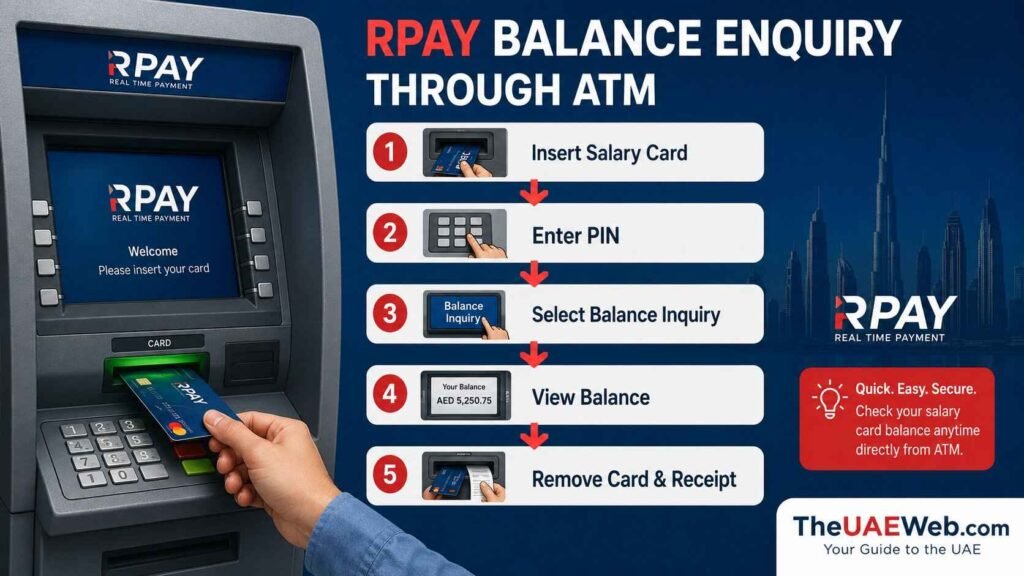
If you don’t have internet access or prefer using your salary card in person, you can check your RPay balance at any compatible ATM in the UAE. This method is quick, secure, and especially useful if you want to confirm your salary before withdrawing cash.
Many employees check their balance at an ATM immediately after payday because they can verify their salary and withdraw money in the same visit.
Before Visiting an ATM
Before checking your balance, make sure you have:
- Your Al Rostamani Salary Card
- Your ATM PIN
- Access to a compatible ATM
For your safety, use ATMs located inside banks, shopping malls, or well-lit public areas, and avoid using damaged or suspicious machines.
Step 1: Insert Your Salary Card
Insert your Al Rostamani Salary Card into a compatible ATM.
Wait for the ATM to read your card before proceeding.
Step 2: Enter Your PIN
Carefully enter your four-digit PIN.
Always cover the keypad while entering your PIN to protect your account information.
Step 3: Select “Balance Inquiry”
Once the ATM menu appears, select the Balance Inquiry option.
Some ATMs may display this option under Account Services or Balance Enquiry.
Step 4: View Your Available Balance
Within a few seconds, your available salary balance will appear on the screen.
Many ATMs also allow you to print a receipt showing your current balance.
Step 5: Remove Your Card
After completing the balance enquiry, collect your card and receipt before leaving the ATM.
Never leave your receipt behind, as it may contain sensitive account information.
Benefits of Checking Your Balance at an ATM
ATM balance enquiries remain popular because they’re available across the UAE and don’t require an internet connection.
Some advantages include:
- No mobile app required.
- Available 24 hours a day at most ATM locations.
- Check your balance before withdrawing cash.
- Instant results.
- Printed balance receipt available on many ATMs.
If you’re planning to withdraw your salary immediately after it’s credited, checking your balance first can help prevent declined transactions.
Method 3: Contact Customer Support for Balance Enquiry
If you’re unable to access the RPay app or use an ATM, you can contact Al Rostamani International Exchange Customer Support for assistance.
This option is useful if you’re experiencing technical issues, your salary hasn’t appeared, or your card has been blocked.
When Should You Contact Customer Support?
Customer support can help if:
- Your salary hasn’t been credited.
- Your card has been blocked.
- You forgot your login credentials.
- The RPay app isn’t working.
- Your balance appears incorrect.
- You need help activating your salary card.
Information You May Need
Before contacting support, keep the following details ready:
- Registered mobile number
- Al Rostamani Salary Card
- Emirates ID
- Passport (if requested)
Providing accurate information helps the support team verify your identity and resolve your issue more quickly.
What Can Customer Support Help With?
Depending on your request, the support team can assist with:
- Balance enquiries
- Salary verification
- Card activation
- PIN reset guidance
- Account verification
- Reporting lost or stolen salary cards
- General payroll account support
How to Check if Your Salary Has Been Credited
One of the main reasons employees perform an RPay balance enquiry is to confirm whether their employer has deposited their monthly salary.
Instead of waiting for an SMS or asking your HR department, you can quickly verify your salary yourself.
The easiest ways to confirm your salary include:
- Open the RPay app and check your available balance.
- Review your recent transaction history.
- Check your balance at a compatible ATM.
- Contact customer support if needed.
If your latest salary payment appears in your transaction history or your available balance has increased by your salary amount, your employer has successfully completed the payroll transfer.
If the payment isn’t showing yet, remember that payroll processing through the UAE Wages Protection System (WPS) can sometimes take several hours, especially during weekends or public holidays.
Salary Not Received? Here’s What You Should Do
If payday has arrived but your RPay balance hasn’t changed, don’t panic. Salary processing can occasionally be delayed for reasons beyond your control.
Before reporting a problem, try these steps:
- Refresh the RPay app and check again after a short time.
- Review your recent transaction history.
- Confirm with your employer or HR department that payroll has been processed.
- Verify that your salary card is active and hasn’t expired.
- Try checking your balance through an ATM.
- Contact Al Rostamani Exchange customer support if your employer confirms the payment has already been sent.
In many cases, delayed salary updates are caused by payroll processing schedules rather than issues with your salary card. Waiting a short while and checking again often resolves the problem.
Common RPay Balance Enquiry Problems and Solutions
Most employees can check their salary balance without any issues, but there are times when the RPay app, salary card, or payroll system may not work as expected. Fortunately, many of these problems can be resolved quickly without visiting an exchange branch.
Below are the most common issues faced by RPay users in the UAE and the best ways to fix them.
My RPay Balance Is Showing Zero
Seeing a zero balance can be worrying, especially around payday. However, it doesn’t always mean there’s a problem with your account.
Possible reasons include:
- Your employer hasn’t processed payroll yet.
- The salary is still being transferred through the UAE Wages Protection System (WPS).
- There is a temporary delay in updating your account.
- You’re checking the wrong salary card.
If your balance still shows zero after several hours, confirm with your employer that the salary has been released before contacting customer support.
Salary Hasn’t Been Credited
If your expected salary hasn’t appeared, first check the payment date provided by your employer.
Salary delays may happen because of:
- Payroll processing delays.
- Weekends or UAE public holidays.
- Banking settlement times.
- Employer approval delays.
If your employer confirms the salary has already been transferred but you still can’t see it in RPay, contact Al Rostamani International Exchange for assistance.
Unable to Log In to the RPay App
If you cannot access your account:
- Make sure you’re using the correct registered mobile number.
- Check your internet connection.
- Reset your password if you’ve forgotten it.
- Update the application to the latest version.
Restarting your phone can also resolve temporary login issues.
OTP Not Received
The One-Time Password (OTP) is required to verify your identity during registration or login.
If you don’t receive the code:
- Check your mobile network signal.
- Wait a few minutes before requesting another OTP.
- Ensure you’re using the registered mobile number.
- Restart your device if necessary.
If the issue continues, contact customer support to verify your mobile number.
RPay App Keeps Crashing
If the application closes unexpectedly:
- Update the app.
- Restart your smartphone.
- Clear the application cache.
- Reinstall the app if the problem continues.
Using the latest version helps improve security and performance.
Salary Card Has Been Blocked
Your salary card may become blocked after several incorrect PIN attempts or due to security reasons.
If this happens:
- Contact Al Rostamani International Exchange immediately.
- Verify your identity.
- Follow the instructions to unblock or replace your card if required.
Forgot Your RPay Password
If you’ve forgotten your login password, don’t worry.
Simply select Forgot Password on the login screen and follow the verification process using your registered mobile number.
Once your identity has been confirmed, you’ll be able to create a new secure password.
Security Tips for RPay Salary Card Users
Your salary card gives you direct access to your monthly income, so protecting your account should always be a priority. A few simple precautions can greatly reduce the risk of fraud and unauthorized access.
Follow these best practices whenever you use RPay or your salary card:
- Only download the official RPay application.
- Never share your PIN, OTP, password, or verification code.
- Avoid logging in using public Wi-Fi networks.
- Enable biometric login if your phone supports it.
- Keep your mobile number updated.
- Regularly review your transaction history.
- Log out when using shared devices.
- Report suspicious activity immediately.
Being cautious with your account details helps keep your salary safe.
Safety Note: Always use the official RPay app, Al Rostamani International Exchange customer support, compatible ATMs, or authorized service channels to check your salary card balance. Never share your PIN, OTP, password, Emirates ID, or full salary card number with anyone, and avoid entering your details on unofficial websites or apps. Using only official channels helps protect your account from fraud and unauthorized access.
Which RPay Balance Enquiry Method Is Best?
There are several official ways to check your Al Rostamani Salary Card balance, and the best method depends on your situation.
| Method | Internet Required | Available 24/7 | Best For |
|---|---|---|---|
| RPay Mobile App | Yes | Yes | Instant salary balance and transaction history |
| ATM Balance Enquiry | No | Yes | Balance check before cash withdrawal |
| Customer Support | No | Working Hours | Account issues and salary verification |
| Exchange Branch | No | Branch Hours | Personal assistance and printed statements |
For most employees, the RPay mobile app is the quickest and most convenient option because it provides real-time salary updates, transaction history, money transfer services, and account management in one place.
Frequently Asked Questions
How can I perform an RPay balance enquiry?
You can perform an RPay balance enquiry by logging into the official RPay mobile app using your registered mobile number and password. Your available salary balance and recent transactions will appear on the dashboard.
Can I check my Al Rostamani Salary Card balance without the RPay app?
Yes. You can also check your salary card balance through compatible ATMs, Al Rostamani International Exchange customer support, or by visiting a nearby branch.
Why is my RPay balance showing zero?
A zero balance usually means your salary hasn’t been credited yet, payroll processing is still underway, or you’re experiencing a temporary system delay. Wait for some time and check again before contacting support.
How do I know if my salary has been credited?
Open the RPay app and review your available balance or recent transaction history. You can also check your balance at an ATM or contact customer support for confirmation.
Is the RPay app free to use?
Yes. Downloading and using the official RPay application is free. Some additional financial services, such as international remittances, may have applicable service charges.
Can I transfer money using RPay?
Yes. Depending on your account type and available services, RPay allows users to send money locally and internationally directly through the application.
What should I do if I forget my RPay password?
Select the Forgot Password option on the login screen and complete the verification process using your registered mobile number to create a new password.
Is RPay safe?
Yes. RPay uses secure authentication, OTP verification, and encrypted connections to protect user information. However, you should never share your password, PIN, or OTP with anyone.
Final Thoughts
The RPay balance enquiry service makes it easy for Al Rostamani Salary Card holders to check their salary, monitor account activity, and manage payroll services without visiting an exchange branch. Whether you use the official RPay mobile app, a compatible ATM, customer support, or an Al Rostamani Exchange branch, you can access your balance through secure and convenient channels.
For most employees in the UAE, the RPay app offers the fastest and most complete experience by providing instant balance updates, salary notifications, transaction history, and additional financial services in one place. Checking your balance regularly helps you confirm salary deposits, manage your monthly budget, and quickly identify any unexpected account activity.
At TheUAEWeb.com, we publish practical UAE banking guides, salary card tutorials, and easy-to-follow financial resources to help residents find accurate and up-to-date information. Explore our latest guides for more step-by-step articles on salary cards, balance enquiries, digital wallets, and everyday banking services across the UAE.