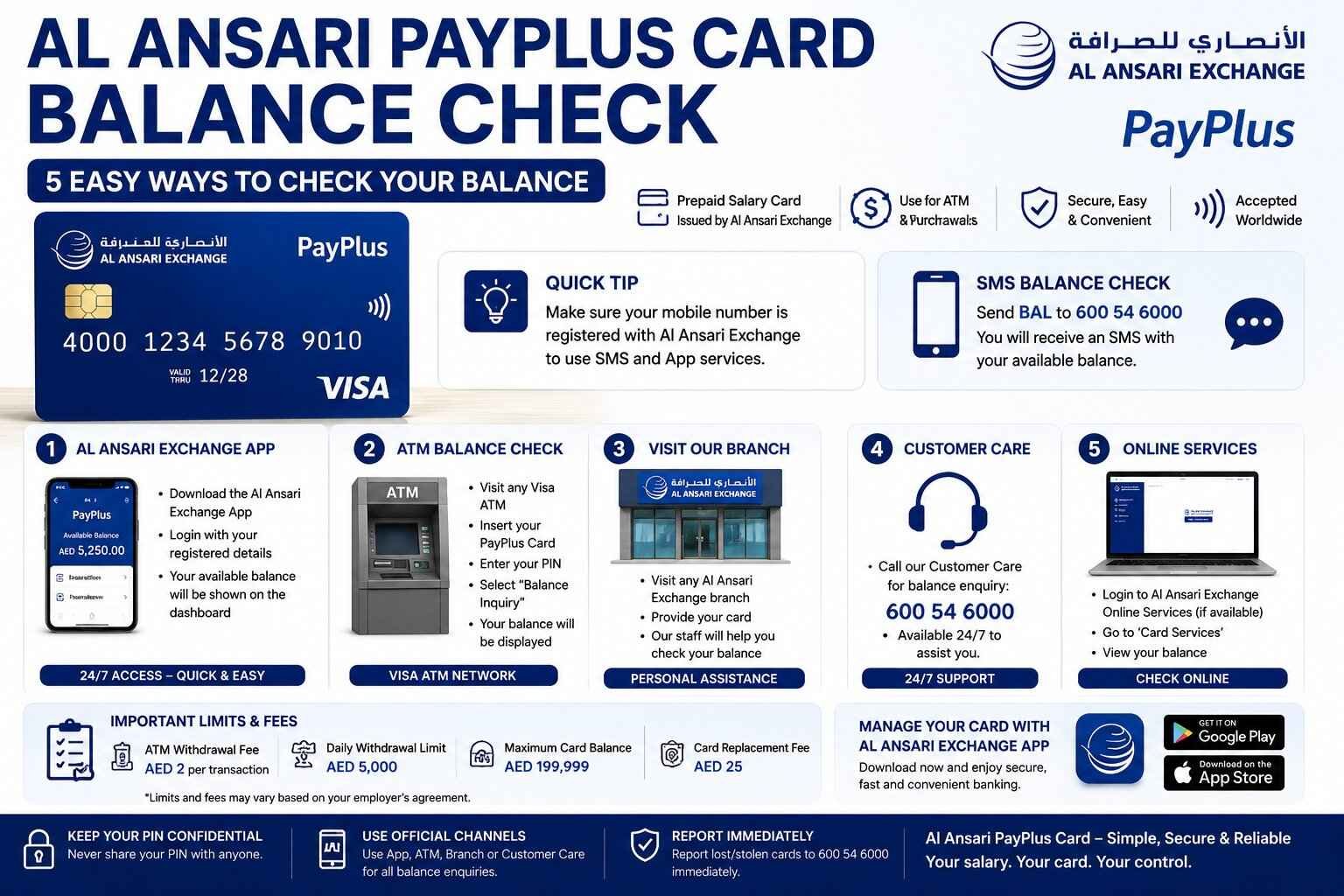
Al Ansari PayPlus Card: Complete Guide to Balance Check, App, Activation & Usage
If your employer pays your salary through the Al Ansari PayPlus Card, you may have questions about activating the card, checking your balance, withdrawing cash, or using it for everyday purchases. Many employees in the UAE search for terms like Al Ansari PayPlus card balance check, PayPlus Card Al Ansari, or Al Ansari PayPlus card app to understand how the service works.
The Al Ansari PayPlus Card is a prepaid Visa salary card designed to make salary payments simple, secure, and accessible. It enables employees to receive salaries under the UAE’s Wage Protection System (WPS) without opening a traditional bank account. Cardholders can use it to withdraw cash, make purchases at Visa merchants, and check their balance through several convenient methods.
In this complete guide, you’ll learn everything about the Al Ansari PayPlus Card, including how to activate it, check your balance, use the official mobile app, understand fees and limits, replace a lost card, and answer the most frequently asked questions. We’ll also compare it with FAB PayPlus to help you understand the differences between the two PayPlus salary solutions.
Whether you’re using the card for the first time or simply looking for a faster way to manage your salary, this guide from TheUAEWeb.com has you covered.
Quick Answer: How to Check Your Al Ansari PayPlus Card Balance
There are several official ways to check your Al Ansari PayPlus card balance.
You can use:
- Al Ansari Exchange App
- SMS balance enquiry (where available)
- Visa-compatible ATM
- Al Ansari Exchange branch
- Official online services (where applicable)
The fastest and easiest method for most users is the Al Ansari Exchange App, which lets you view your balance, salary credits, and recent transactions anytime.
What Is the Al Ansari PayPlus Card?
The Al Ansari PayPlus Card is a prepaid Visa salary card issued by Al Ansari Exchange in partnership with First Abu Dhabi Bank (FAB). It is designed for employees who receive their salaries through the UAE’s Wage Protection System (WPS).
Instead of opening a traditional bank account, employees receive their monthly salary directly on the PayPlus Card. They can then use the card for ATM withdrawals, shopping, online payments, and balance enquiries.
The card provides a convenient way to access salary funds while reducing the need to carry cash.
How Does the Al Ansari PayPlus Card Work?
Once your employer enrolls you in the salary program, your monthly salary is loaded onto your PayPlus Card.
After activation, you can:
- Check your available balance
- Withdraw cash from ATMs
- Shop at Visa merchants
- Make eligible online purchases
- Review transaction history
- Receive salary notifications (where available)
The card functions much like a prepaid debit card, allowing you to use the available balance without needing a conventional bank account.
Key Features of the Al Ansari PayPlus Card
The Al Ansari PayPlus Card offers several useful features that make salary management easy for employees.
Some of the main features include:
- Monthly salary deposits through WPS
- Visa acceptance worldwide where supported
- ATM cash withdrawals
- Secure online and in-store shopping
- Balance enquiry through multiple channels
- Access to the Al Ansari Exchange App
- Transaction history
- Enhanced security with PIN protection
These features make the PayPlus Card a practical solution for employees across different industries in the UAE.
How to Activate Your Al Ansari PayPlus Card
Before using your card, you’ll need to complete the activation process.
The exact activation method may vary depending on your employer and card program, but it generally involves the following steps.
Step 1: Receive Your Card
Your employer or payroll administrator will provide your Al Ansari PayPlus Card after enrollment in the salary program.
Step 2: Follow the Activation Instructions
You’ll receive activation instructions with your card or via SMS.
Carefully follow the provided instructions to activate the card.
Step 3: Set Your PIN
Choose or activate your Personal Identification Number (PIN).
Keep your PIN confidential and never share it with anyone.
Step 4: Verify Successful Activation
Once activated, your card will be ready to receive salary payments and perform transactions.
If you encounter any issues during activation, contact Al Ansari Exchange customer support or visit your nearest branch for assistance.
Al Ansari PayPlus Card Balance Check
Checking your available salary balance is simple and can be done through several official methods.
Method 1: Al Ansari PayPlus Card App
The easiest way to perform an Al Ansari PayPlus card balance check is through the official Al Ansari Exchange App.
After logging into the app, you can:
- View your available balance
- Check salary deposits
- Review transaction history
- Monitor card activity
- Access additional card services
Because it’s available 24/7, the app is the preferred option for most users.
Method 2: Al Ansari PayPlus Card Balance Check by SMS
Eligible cardholders may check their balance by sending:
BAL to 600 54 6000
If SMS balance enquiries are available for your card, you’ll receive a reply with your current balance.
Standard SMS charges may apply depending on your mobile service provider.
Method 3: Check Your Balance at an ATM
You can also use any Visa-compatible ATM.
Simply:
- Insert your card.
- Enter your PIN.
- Select Balance Inquiry.
- View your available balance.
Some ATM operators may charge a fee for balance enquiries.
Method 4: Visit an Al Ansari Exchange Branch
If you prefer face-to-face assistance, visit any Al Ansari Exchange branch.
Customer service staff can help you:
- Check your balance
- Review salary deposits
- Resolve card issues
- Replace damaged cards
- Update account information
Method 5: Al Ansari PayPlus Card Balance Check Online
Many users search for Al Ansari PayPlus card balance check online.
Depending on your card services, online account management is generally available through the official Al Ansari Exchange digital channels.
Always use official websites and applications when accessing your account.
Avoid entering your card information on unofficial websites or third-party balance check services.
How to Download and Use the Al Ansari PayPlus Card App
The official Al Ansari Exchange App makes it easy to manage your PayPlus Card from your smartphone. Instead of visiting a branch or ATM every time you need to check your salary, you can access your account anytime.
The app is available for both Android and iPhone users through the official app stores.
How to Register
After downloading the app:
- Open the Al Ansari Exchange App.
- Register using your mobile number or the details linked to your PayPlus Card.
- Complete the verification process.
- Create a secure password.
- Log in to access your account.
If you experience registration issues, contact Al Ansari Exchange customer support or visit your nearest branch for assistance.
What You Can Do in the App
The Al Ansari Exchange App offers several useful features for PayPlus Card users.
These include:
- Check your available balance
- View salary credits
- Review transaction history
- Monitor recent purchases
- Check ATM withdrawals
- Manage your card
- Access customer support services
Using the app regularly helps you stay updated on your salary and account activity.
Salary Withdrawal Options
One of the main benefits of the Al Ansari PayPlus Card is easy access to your salary.
Depending on your needs, you can withdraw cash using several methods.
ATM Cash Withdrawal
The most common option is withdrawing cash from Visa-compatible ATMs across the UAE.
Simply:
- Insert your card.
- Enter your PIN.
- Choose Cash Withdrawal.
- Select or enter the amount.
- Collect your cash and receipt.
Always keep your receipt until you’ve confirmed the transaction.
Al Ansari Exchange Branch
Some cardholders prefer visiting an Al Ansari Exchange branch to access financial services or seek assistance with salary-related queries.
Branch staff can also provide guidance if your card isn’t working correctly.
Visa Merchant Payments
Instead of withdrawing cash, you can use your PayPlus Card directly for purchases at stores displaying the Visa logo.
This can be a safer and more convenient option than carrying cash.
Online Shopping
Most PayPlus Cards also support online payments at eligible merchants.
When shopping online:
- Ensure the website is secure.
- Verify your available balance.
- Complete OTP verification if required.
- Keep records of your transactions.
Al Ansari PayPlus Card Fees and Limits
The fees and transaction limits associated with the Al Ansari PayPlus Card may vary depending on your employer’s salary package and the card program.
Below is a general overview of commonly applicable fees and limits.
| Service | Typical Information |
|---|---|
| Salary Deposit | Usually free |
| Balance Check via App | Free |
| ATM Balance Inquiry | ATM operator fees may apply |
| ATM Cash Withdrawal | Around AED 2 at participating ATMs (subject to your program) |
| Replacement Card | Around AED 25 (subject to applicable terms) |
| Daily ATM Withdrawal Limit | Up to AED 5,000 (depending on your card program) |
| Maximum Card Balance | Up to AED 199,999 (subject to program rules) |
| International Transactions | Currency conversion charges may apply |
These figures are general references. Your employer’s PayPlus package may have different fees or limits, so always refer to the latest official schedule provided with your card.
Can You Use the Al Ansari PayPlus Card Internationally?
In many cases, yes.
Because the card operates on the Visa network, it may be accepted at millions of merchants and ATMs worldwide wherever Visa is supported.
However, before using your card overseas, remember:
- International transaction fees may apply.
- Currency conversion charges may be deducted.
- Some countries or merchants may have restrictions.
- Your available balance must be sufficient to cover the purchase and any applicable fees.
If you’re planning to travel, it’s a good idea to check with Al Ansari Exchange regarding international usage and applicable charges.
What Should You Do If Your PayPlus Card Is Lost or Stolen?
If your Al Ansari PayPlus Card is lost, stolen, or damaged, act quickly to protect your salary.
Follow these steps:
- Contact Al Ansari Exchange immediately.
- Request that your card be blocked.
- Report any unauthorized transactions.
- Apply for a replacement card.
- Continue monitoring your account after receiving the new card.
Reporting a lost card promptly reduces the risk of unauthorized use.
Security Tips for Al Ansari PayPlus Card Users
Keeping your PayPlus Card secure is essential to protecting your salary.
Here are some important safety tips.
Never Share Your PIN
Your PIN should remain confidential at all times.
Never share it with friends, family members, or anyone claiming to work for the bank or exchange house.
Protect Your OTP
If you receive a One-Time Password (OTP), use it only for your own transactions.
No legitimate representative will ask for your OTP.
Use Only Official Apps
Download the Al Ansari Exchange App only from official app stores.
Avoid installing applications from unknown websites or third-party sources.
Check Your Balance Regularly
Review your balance and transaction history frequently.
Early detection of unauthorized activity makes it easier to resolve potential issues.
Be Careful at ATMs
Before using an ATM, inspect it for signs of tampering.
If anything appears unusual, use another ATM and report the issue.
Frequently Asked Questions
What is the Al Ansari PayPlus Card?
The Al Ansari PayPlus Card is a prepaid Visa salary card issued by Al Ansari Exchange in partnership with First Abu Dhabi Bank (FAB). It allows employees to receive salaries under the UAE’s Wage Protection System.
How do I check my Al Ansari PayPlus Card balance?
You can check your balance through the Al Ansari Exchange App, SMS (where available), a Visa-compatible ATM, an Al Ansari Exchange branch, or official online services where applicable.
Which app should I use for my PayPlus Card?
Al Ansari PayPlus Card users should use the official Al Ansari Exchange App.
If your employer uses FAB PayPlus instead, you’ll need the Payit app.
Is Al Ansari PayPlus the same as FAB PayPlus?
No.
Although both are salary solutions, they are different products.
The Al Ansari PayPlus Card is a prepaid salary card, while FAB PayPlus is a digital salary account managed through the Payit app.
Can I shop online using my PayPlus Card?
Yes.
Most Al Ansari PayPlus Cards support online purchases wherever Visa is accepted, provided online transactions are enabled.
Can I withdraw cash from any ATM?
You can generally withdraw cash from Visa-compatible ATMs in the UAE and other supported locations, subject to applicable fees and limits.
What should I do if my salary has not been credited?
First, check your balance using the official app or ATM. If the salary is still unavailable, contact your employer’s payroll department before contacting Al Ansari Exchange for further assistance.
Related Guides
Looking for more information about PayPlus salary solutions? You may also find these guides useful:
- PayPlus Card: Complete Guide to Balance Check, Online Access & Al Ansari vs FAB PayPlus
- FAB PayPlus (Payit Plus): Complete Guide to Balance Check, Features & Account Management
These articles explain the differences between the two PayPlus products and provide detailed guidance on balance checks, account management, and salary services.
Conclusion
The Al Ansari PayPlus Card is a convenient salary solution that allows employees in the UAE to receive and manage their wages safely and efficiently. With multiple balance check options, ATM access, online shopping capabilities, and the official Al Ansari Exchange App, cardholders can easily stay in control of their finances.
Whether you need to check your balance, withdraw cash, activate your card, or understand the available features, using the official Al Ansari Exchange channels ensures a secure and smooth experience.
If you’re unsure whether you have an Al Ansari PayPlus Card or a FAB PayPlus account, our detailed comparison guide can help you identify your salary solution and choose the correct balance-check method.
At TheUAEWeb.com, we are committed to publishing accurate, practical, and up-to-date UAE finance guides that help residents and employees make informed financial decisions with confidence.
Safety Note: TheUAEWeb.com is an independent informational website and is not affiliated with Al Ansari Exchange, First Abu Dhabi Bank (FAB), or any UAE government authority. Never share your full card number, PIN, CVV, OTP, Emirates ID, or login credentials with anyone. Always use the official Al Ansari Exchange App, authorized ATMs, branches, and customer support channels to manage your PayPlus Card securely.