FAB Mobile Banking UAE (2026 Guide): Everything You Need to Know
Managing your bank account no longer requires visiting a branch or waiting in long queues. Whether you want to transfer money, pay a credit card bill, check your salary, freeze a lost debit card, or simply view your account balance, FAB Mobile Banking lets you do everything directly from your smartphone.
First Abu Dhabi Bank (FAB), the UAE’s largest bank, has invested heavily in digital banking, making everyday banking faster, safer, and more convenient for millions of customers. The FAB Mobile App combines personal banking, credit card management, loans, investments, bill payments, and card controls into one secure platform.
Whether you’re a new customer looking to register for the first time or an existing user facing login issues, this guide explains everything in simple language. You’ll learn how to register, activate the app, use its key features, troubleshoot common problems, and keep your account secure.
If you use a FAB account in the UAE, this guide on Theuaeweb.com covers almost everything you need to know.
What is FAB Mobile Banking?
FAB Mobile Banking is the official digital banking service provided by First Abu Dhabi Bank (FAB). It allows customers to manage their finances from anywhere without visiting a physical branch.
Available for both Android and iPhone users, the app offers secure access to your bank accounts, debit cards, credit cards, loans, investments, and other banking services 24 hours a day.
Instead of relying on traditional banking hours, customers can perform most banking activities within minutes using biometric login, PIN authentication, or One-Time Password (OTP) verification.
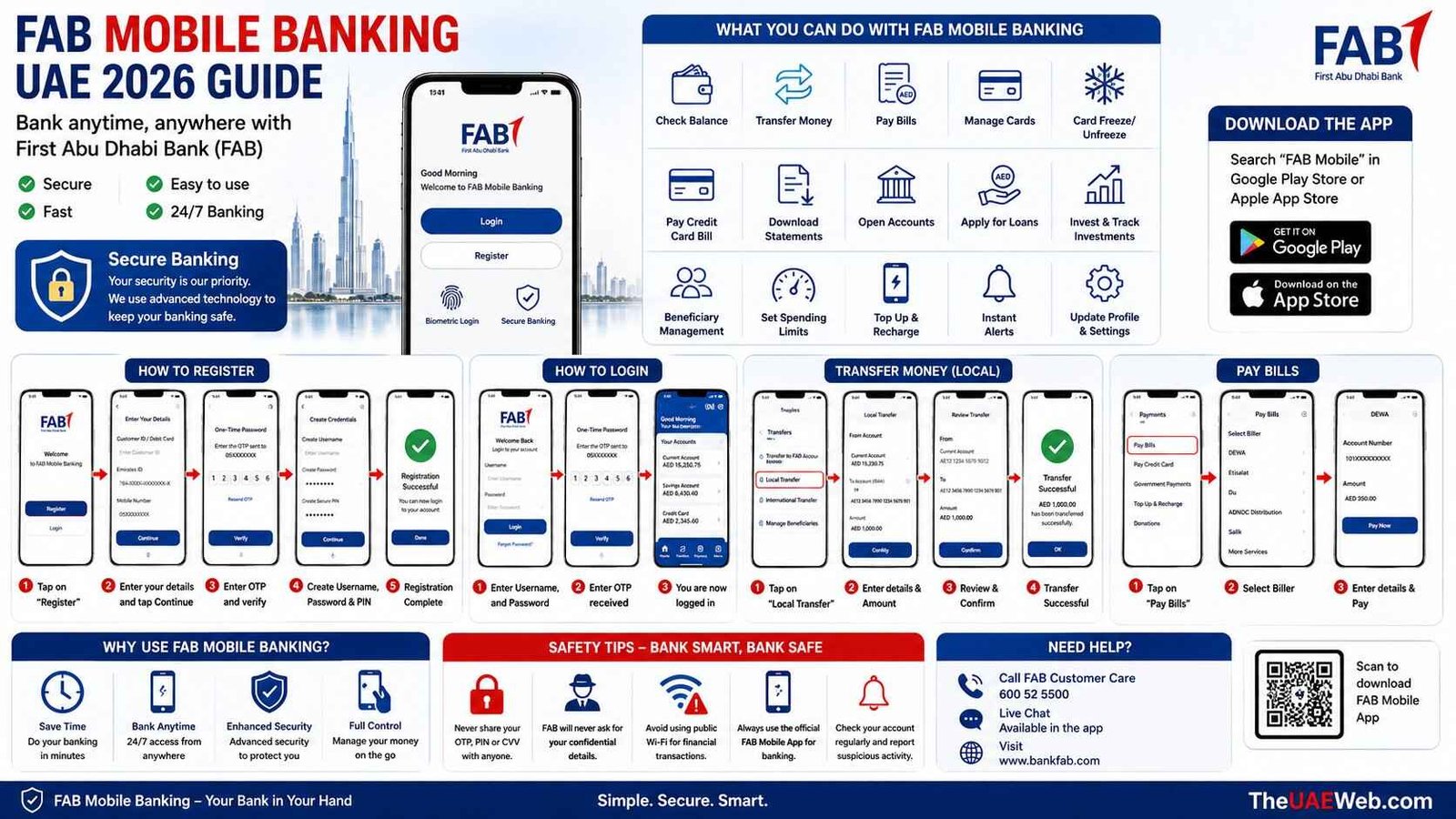
What Can You Do with FAB Mobile Banking?
The app is designed to replace many everyday banking tasks.
With the FAB Mobile App, you can:
- Check account balance instantly
- View transaction history
- Transfer money within FAB or other UAE banks
- Send international transfers
- Pay utility bills
- Pay credit card bills
- Activate or replace debit cards
- Freeze or unblock cards instantly
- Change card limits
- Manage beneficiaries
- Open savings accounts
- Apply for loans
- Apply for credit cards
- Track investments
- Download account statements
- Update personal information
- Receive instant transaction alerts
For most customers, visiting a branch is only necessary for a few specialized banking services.
Who Can Register for FAB Mobile Banking?
FAB Mobile Banking is available for most personal banking customers.
You can usually register if you have:
- A FAB current account
- A savings account
- A salary account
- A debit card
- A FAB credit card
- A valid Emirates ID
- A registered UAE mobile number
Business customers have separate digital banking services designed specifically for corporate banking.
How to Register for FAB Mobile Banking
Registration usually takes just a few minutes.
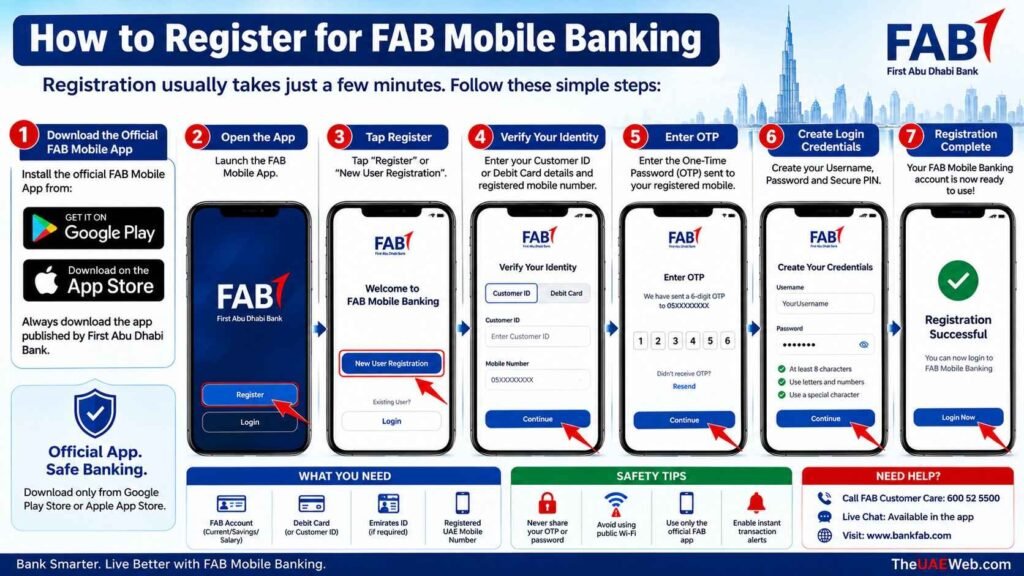
Step 1: Download the Official FAB Mobile App
Install the official FAB Mobile App from:
- Google Play Store (Android)
- Apple App Store (iPhone)
Always download the app published by First Abu Dhabi Bank.
Step 2: Open the App
Launch the application.
Tap Register or New User Registration.
Step 3: Verify Your Identity
You’ll normally need:
- Customer ID or Debit Card
- Registered mobile number
- Emirates ID (if requested)
Step 4: Enter OTP
FAB sends a One-Time Password to your registered mobile number.
Enter the OTP to continue.
Step 5: Create Login Credentials
Create:
- Username
- Password
- Secure PIN
You can also enable fingerprint or Face ID login for quicker access.
Step 6: Registration Complete
Your FAB Mobile Banking account is now ready to use.
You can immediately access your banking dashboard.
How to Log In to FAB Mobile Banking
After registration:
- Open the FAB Mobile App.
- Enter your username.
- Type your password.
- Complete OTP verification if requested.
- Use fingerprint or Face ID if enabled.
Within seconds, you’ll have access to your accounts.
Key Features of FAB Mobile Banking
Unlike many banking apps that only provide basic balance checks, FAB Mobile Banking acts as a complete financial management platform.
Some of its most useful features include:
- Instant balance enquiry
- Credit card management
- Utility bill payments
- Local and international transfers
- Scheduled payments
- Standing instructions
- Savings account management
- Loan information
- Card activation
- Card freeze/unfreeze
- Investment services
- eStatements
- Secure notifications
- Beneficiary management
These tools help customers manage nearly every aspect of their banking without visiting a branch.
Why Millions of UAE Customers Use FAB Mobile Banking
The app has become one of the most widely used banking applications in the UAE because it offers speed, convenience, and security in one place.
Customers can complete transactions in minutes, receive instant payment confirmations, monitor spending in real time, and manage cards without contacting customer support. Whether you’re paying bills, sending money to family, or checking your salary after payday, the app keeps essential banking services available 24/7.
For residents with busy schedules, FAB Mobile Banking reduces the need for branch visits while giving greater control over personal finances. It also includes advanced security features such as biometric login, OTP verification, and instant card controls, helping users bank confidently from anywhere.
How to Transfer Money Using FAB Mobile Banking
One of the biggest advantages of FAB Mobile Banking is the ability to transfer money anytime without visiting a branch. Whether you’re sending money to another FAB account, transferring funds to another UAE bank, or making an international remittance, the process is quick and secure.
Transfer Money Within FAB
Sending money to another FAB customer usually takes only a few seconds.
Follow these steps:
- Open the FAB Mobile App.
- Sign in securely.
- Tap Transfers.
- Select Transfer to FAB Account.
- Choose an existing beneficiary or add a new one.
- Enter the transfer amount.
- Review the payment details carefully.
- Confirm the transfer using OTP if prompted.
Most transfers between FAB accounts are processed instantly.
Transfer to Another UAE Bank
The app also supports transfers to accounts held with other UAE banks.
Simply:
- Select Local Transfer
- Add the beneficiary’s IBAN
- Verify beneficiary details
- Enter the amount
- Confirm the payment
Processing time depends on the UAE banking network and transfer method.
International Money Transfer
FAB Mobile Banking also allows eligible customers to send money abroad directly through the app.
Depending on the destination country, transfers can often be completed within one business day.
Always verify exchange rates and applicable transfer fees before confirming an international payment.
How to Pay Bills Using FAB Mobile Banking
Instead of standing in queues, customers can pay most UAE utility and service bills directly from the app.
Supported payments may include:
- Electricity bills
- Water bills
- Telephone bills
- Internet services
- Credit card payments
- Government service payments
- Salik recharge
- School fee payments (where supported)
Steps to Pay Bills
- Open the FAB Mobile App.
- Log in.
- Tap Payments.
- Select the bill category.
- Choose the service provider.
- Enter the required account number.
- Confirm the amount.
- Complete payment.
Most payments are confirmed immediately.
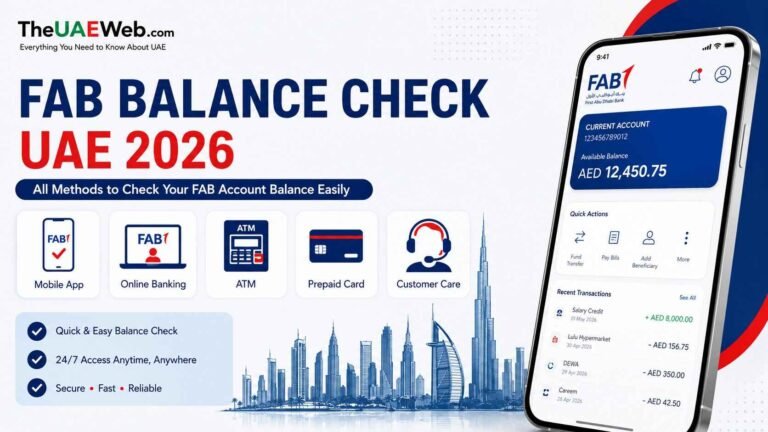
How to Check Your FAB Account Balance
Checking your balance is one of the most commonly used features.
After logging in, your dashboard immediately displays:
- Available balance
- Current balance
- Savings account balance
- Credit card outstanding balance
- Recent transactions
You don’t need to visit an ATM or branch just to view your account balance.
How to Download Your Bank Statement
Customers often require account statements for:
- Visa applications
- Salary verification
- Loan applications
- Rental agreements
- Personal records
Downloading a statement is straightforward.
Steps
- Open FAB Mobile Banking.
- Select your account.
- Tap Statements.
- Choose the required month.
- Download the PDF statement.
The statement can then be shared by email or printed if necessary.
How to Activate Your Debit or Credit Card
If you’ve received a new FAB card, activation can usually be completed within minutes.
Steps
- Open the FAB Mobile App.
- Log in.
- Tap Cards.
- Select the new card.
- Tap Activate Card.
- Verify using OTP.
- Create your ATM PIN if required.
Your card is then ready for purchases, ATM withdrawals, and online payments.
How to Freeze or Unfreeze Your Card
Misplaced your wallet?
Instead of calling customer support immediately, FAB Mobile Banking allows you to temporarily freeze your card.
To Freeze Your Card
- Open the app.
- Select Cards.
- Choose your debit or credit card.
- Tap Freeze Card.
This instantly blocks new transactions while allowing you to reactivate the card later if you find it.
If the card has been stolen, permanently block it and request a replacement.
FAB Mobile Banking Not Working Today?
There are several possible reasons.
Scheduled Maintenance
FAB occasionally performs system maintenance to improve security and performance.
During this time:
- Login may fail.
- Transfers may be temporarily unavailable.
- Some banking services may not load.
Usually, services return shortly after maintenance is completed.
Poor Internet Connection
Many login issues are caused by unstable mobile data or Wi-Fi.
Try:
- Switching networks
- Restarting Wi-Fi
- Using mobile data
Outdated Mobile App
Using an older version of the app can cause compatibility issues.
Visit the Google Play Store or Apple App Store and install the latest update.
Server Issues
Occasionally, FAB servers experience temporary technical problems.
In such cases, waiting a few minutes and trying again usually resolves the issue.
Incorrect Login Credentials
Multiple incorrect password attempts may temporarily lock your account.
Use the Forgot Password option if necessary.
How to Reset Your FAB Mobile Banking Password
Forgot your password?
You don’t usually need to visit a branch.
Simply:
- Open the FAB Mobile App.
- Tap Forgot Password.
- Enter your Customer ID.
- Verify using OTP.
- Create a new password.
- Log in again.
Choose a strong password that combines letters, numbers, and symbols for better security.
FAB Mobile Banking Security Features
Security is one of the biggest reasons millions of UAE residents trust FAB Mobile Banking. Every transaction is protected using multiple layers of security to help safeguard your money and personal information.
Some of the security features include:
- Biometric login (Fingerprint and Face ID)
- One-Time Password (OTP) verification
- Device authentication
- End-to-end encryption
- Instant transaction alerts
- Secure password protection
- Card freeze and unblock controls
- Automatic logout after inactivity
These features help reduce the risk of unauthorized access while allowing you to manage your account confidently.
FAB Mobile Banking Fees
Most everyday mobile banking services are available without additional charges.
Services generally offered free include:
- Account balance enquiry
- Mini statements
- Viewing transaction history
- Downloading eStatements
- Local beneficiary management
- Card controls
- Bill payments
- Profile updates
However, certain banking transactions may involve fees, such as:
- International money transfers
- Foreign currency conversions
- Demand drafts
- Replacement cards
- Special banking services
Always review the applicable charges before confirming any transaction.
Tips to Get the Most Out of FAB Mobile Banking
Many users only use the app to check their balance, but it offers much more.
To make the most of FAB Mobile Banking:
- Enable fingerprint or Face ID for faster logins.
- Turn on instant transaction notifications.
- Regularly review your spending history.
- Schedule recurring transfers for savings.
- Download monthly account statements.
- Use the card freeze feature if your card is misplaced.
- Keep your mobile number and email address updated.
- Install app updates to access the latest features and security improvements.
Using these features can save time and help you manage your finances more effectively.
Safety Tips for FAB Mobile Banking Users
Online banking is secure when used correctly, but customers should always remain cautious.
Follow these safety practices whenever you use FAB Mobile Banking:
- Never share your OTP with anyone.
- Never disclose your ATM PIN, password, or CVV.
- Only download the official FAB Mobile App from Google Play or the Apple App Store.
- Avoid logging in over public Wi-Fi networks.
- Log out after using the app on a shared device.
- Enable biometric authentication for additional protection.
- Check your transaction history regularly.
- Report any suspicious activity immediately.
Important: First Abu Dhabi Bank (FAB) will never ask for your OTP, password, ATM PIN, or full card details through phone calls, SMS, WhatsApp, or email. If anyone requests this information while claiming to represent FAB, treat it as a scam and contact the bank through its official customer care channels.
People Also Ask
How do I register for FAB Mobile Banking?
Download the official FAB Mobile App, tap Register, verify your identity using your customer details and OTP, then create your username and password.
Is FAB Mobile Banking free?
Yes. The app is free to download and use. Some banking transactions, such as international transfers, may incur service charges.
Can I use FAB Mobile Banking outside the UAE?
Yes. As long as you have internet access and can receive OTPs when required, you can securely access your account from almost anywhere in the world.
Why can’t I log in to the FAB Mobile App?
Common reasons include an incorrect password, poor internet connection, an outdated app version, temporary maintenance, or server issues. Updating the app or resetting your password often resolves the problem.
How do I activate a new debit card in FAB Mobile Banking?
Open the app, go to Cards, select your new card, tap Activate Card, verify using OTP, and create your ATM PIN if prompted.
Can I transfer money internationally using FAB Mobile Banking?
Yes. Eligible customers can send international transfers directly through the app to supported countries, subject to applicable fees and exchange rates.
How do I download my FAB bank statement?
Log in to the app, select your account, open Statements, choose the required month, and download the statement in PDF format.
Can I block my debit card using the FAB Mobile App?
Yes. Under the Cards section, you can instantly freeze or temporarily unblock your card without contacting customer support.
Does FAB Mobile Banking support biometric login?
Yes. The app supports Fingerprint and Face ID authentication on compatible Android and iPhone devices.
What should I do if I change my mobile number?
Update your registered mobile number through the FAB Mobile App, Online Banking, or by visiting a FAB branch if additional verification is required.
Is FAB Mobile Banking safe?
Yes. FAB uses encryption, OTP verification, biometric authentication, and device security to help protect customer accounts. Users should also follow recommended security practices to keep their accounts safe.
Final Thoughts
FAB Mobile Banking has transformed the way customers manage their finances in the UAE. From checking your balance and paying bills to transferring money, activating cards, and downloading account statements, the app brings nearly every essential banking service to your smartphone.
Whether you’re a new customer registering for the first time or an existing user looking to solve login issues, understanding how the app works helps you bank more efficiently and securely. By following the safety tips in this guide and using the app’s built-in security features, you can confidently handle your day-to-day banking anytime and anywhere.
At TheUAEWeb.com, we regularly publish practical UAE banking guides, financial tips, and step-by-step tutorials to help residents make the most of digital banking services.