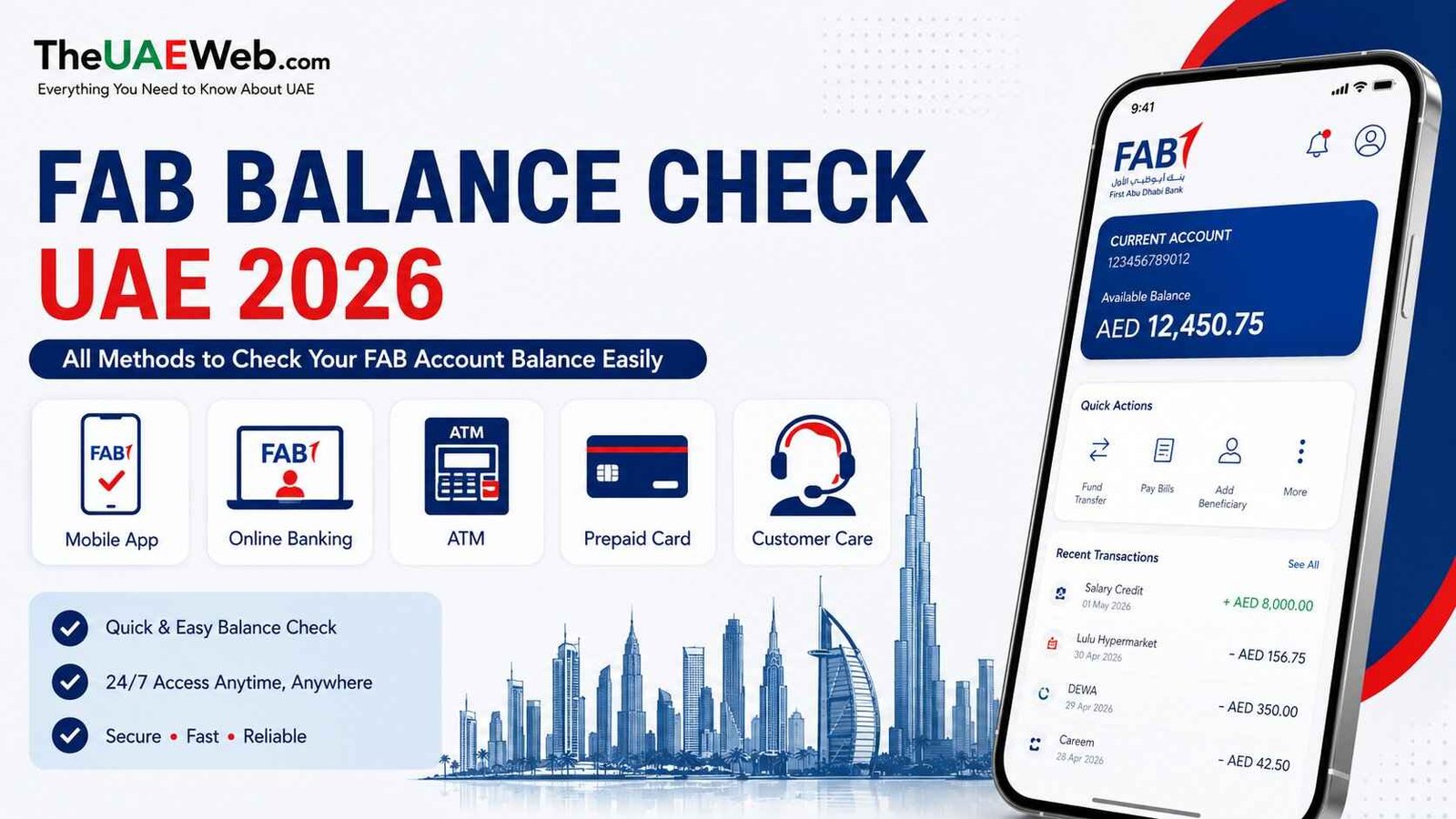
FAB Balance Check UAE 2026: How to Check FAB Account Balance Online, App, ATM and More
Managing your money in the UAE becomes much easier when you know exactly how much balance is available on your FAB account or prepaid card. Whether you are waiting for your salary, checking a recent transfer, tracking daily expenses, or making sure your card has enough funds before a payment, a quick FAB balance check helps you stay financially organized.
Many FAB customers do not want to visit a branch every time they need a simple balance update. The good news is that First Abu Dhabi Bank (FAB) provides several convenient ways to check your balance from anywhere in the UAE.
You can check your FAB balance using online banking, the FAB Mobile App, ATM machines, PPC Magnati Portal for prepaid and Ratibi cards, Payit Wallet, phone banking, and other available services.
Safety Note:
Always check your FAB balance only through the official FAB Mobile App, FAB Online Banking, ATM, SMS banking, or by contacting FAB customer service. Never share your PIN, OTP, CVV, or password with anyone, and avoid entering your details on unofficial websites or links.
If you want to check your FAB balance directly, you can use the official FAB balance inquiry service below:
In this complete FAB balance check guide, we explain every method step by step, including online checking, mobile app instructions, ATM balance inquiry, prepaid card methods, common problems, and solutions to help you manage your money easily in the UAE.
What Is FAB Balance Check?
A FAB balance check means checking the amount of money currently available in your FAB bank account or FAB prepaid card.
Customers check their balance for different reasons:
- Confirming salary payment
- Tracking expenses
- Checking received transfers
- Monitoring card spending
- Planning monthly payments
- Avoiding declined transactions
Instead of waiting for a monthly statement, digital banking allows customers to see their current financial position anytime.
FAB provides different options depending on what type of customer you are:
- FAB bank account holder
- FAB credit card customer
- FAB prepaid card user
- Salary card user
How to Check FAB Balance Online in UAE
The easiest method for many customers is checking their balance online.
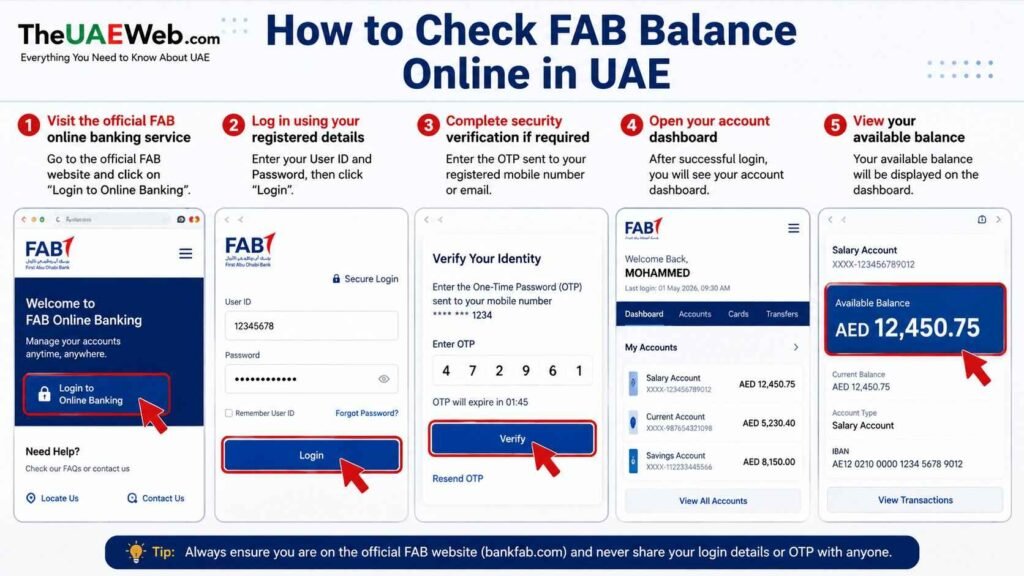
FAB online services allow customers to view account information without visiting a branch.
To check your FAB balance online:
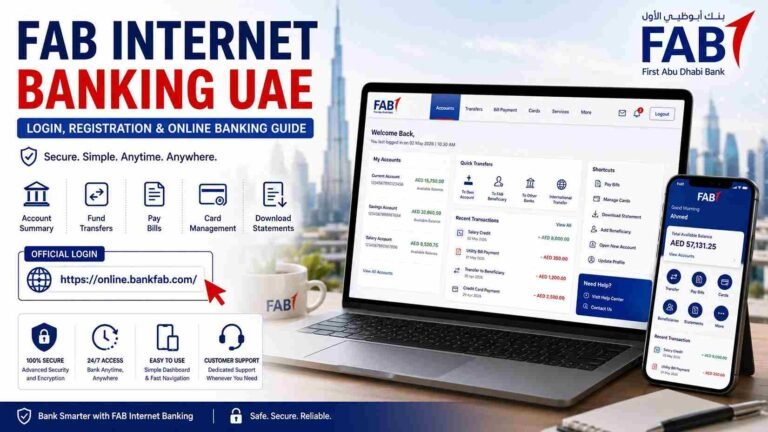
- Visit the official FAB online banking service
- Log in using your registered details
- Complete security verification if required
- Open your account dashboard
- View your available balance
Online banking is useful because you can also check:
- Recent transactions
- Transfers
- Payments
- Account details
- Card information
This method works well for customers who prefer using a computer or browser instead of a mobile application.
FAB Balance Check Through Mobile App
The FAB Mobile app is one of the fastest ways to check your balance in the UAE.
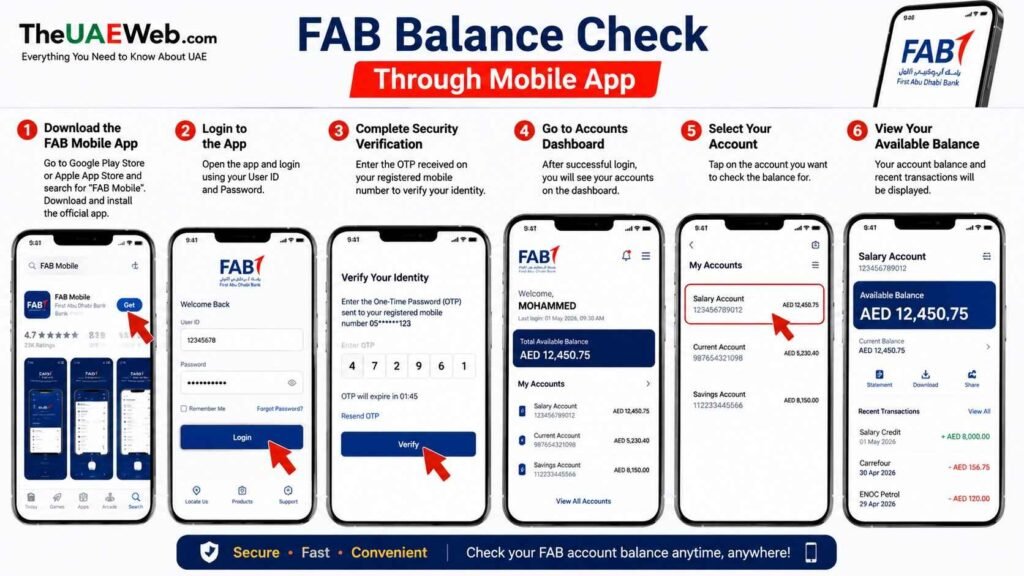
With the app, customers can manage banking services directly from their smartphone.
Steps to check FAB balance using the app:
- Download the FAB Mobile app
- Log in to your account
- Complete verification
- Select your account
- Check your available balance
The app allows you to do more than just check your balance.
You can also:
- View transaction history
- Transfer money
- Pay bills
- Manage cards
- Receive banking notifications
For customers who check their balance regularly, the mobile app is usually the most convenient option.
Use red arrows/highlights and TheUAEWeb.com branding.
FAB Balance Check Through ATM
If you do not have internet access, you can check your FAB balance through an ATM.
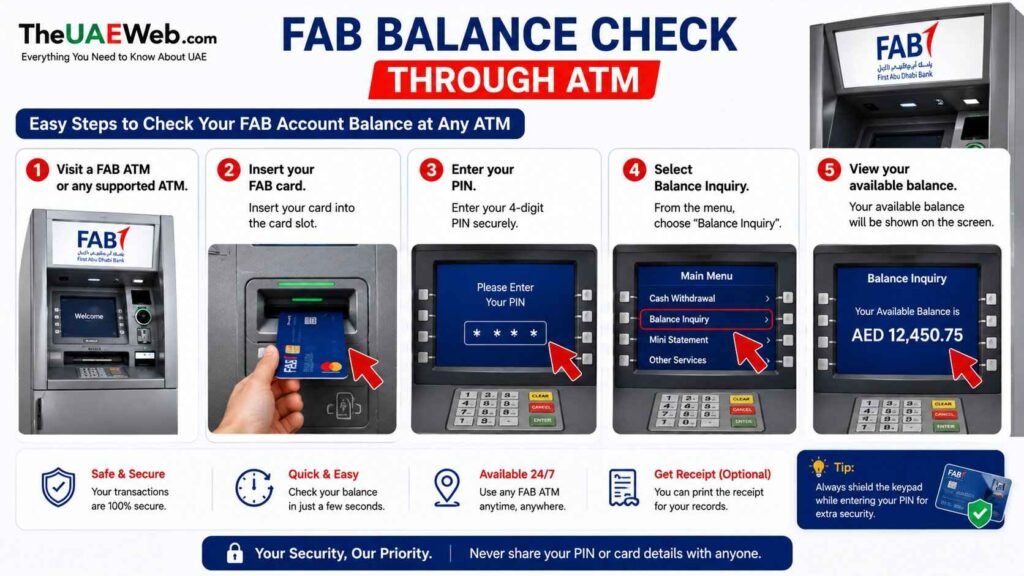
Steps:
- Visit a FAB ATM or supported ATM
- Insert your card
- Enter your PIN
- Select balance inquiry
- View your available balance
ATM balance inquiry is useful when you are already withdrawing cash or need a quick check while outside.
Some ATMs may also provide a printed balance receipt.
PPC Magnati Portal (Best for Ratibi and Prepaid Card Holders)
For Ratibi card and FAB prepaid card users in the UAE, the PPC Magnati Portal is one of the quickest ways to check your available balance online.
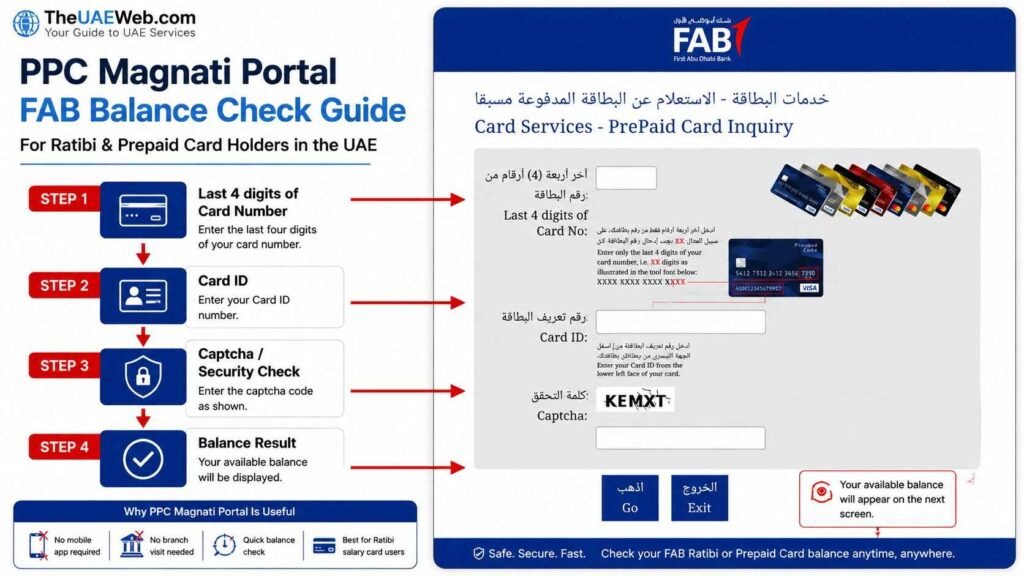
Many employees use Ratibi cards for salary payments, and the Magnati prepaid card portal allows users to view their balance without visiting a branch or using an ATM.
You only need your card details and an internet connection.
What You Need Before Checking Balance
Prepare:
- Last 4 digits of your Ratibi or prepaid card number
- Card ID
- Internet connection
Steps to Check FAB Balance Through PPC Magnati Portal
- Open the official PPC Magnati balance inquiry page
- Enter the last four digits of your card number
- Enter your Card ID
- Complete the security verification
- Click on the balance inquiry option
- Your available card balance will appear on the screen
Why PPC Magnati Portal Is Useful
The PPC Magnati Portal is helpful because:
- No mobile app is required
- No branch visit is needed
- Quick balance checking from phone or computer
- Useful for Ratibi salary card users
If your salary has been credited but you are unsure about the available amount, this is usually the fastest checking method.
Payit Wallet App: Check FAB Ratibi Card Balance and Manage Your Salary Digitally
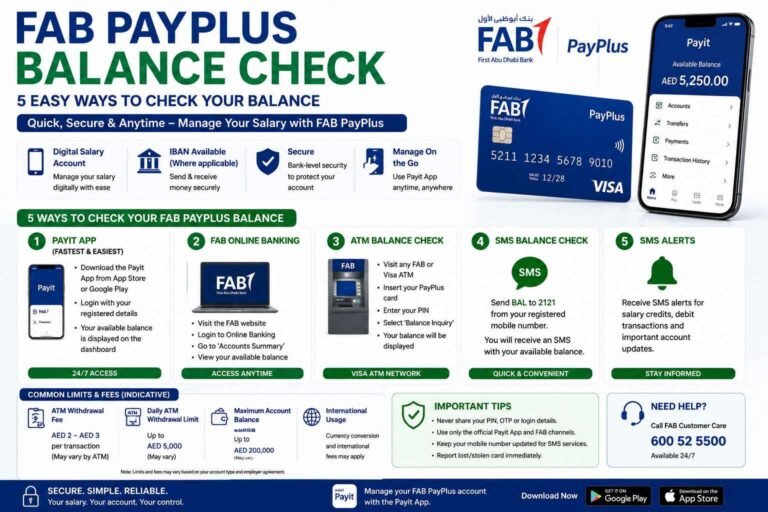
For Ratibi salary card users in the UAE, the Payit Wallet App is another convenient way to check balance and manage money digitally.
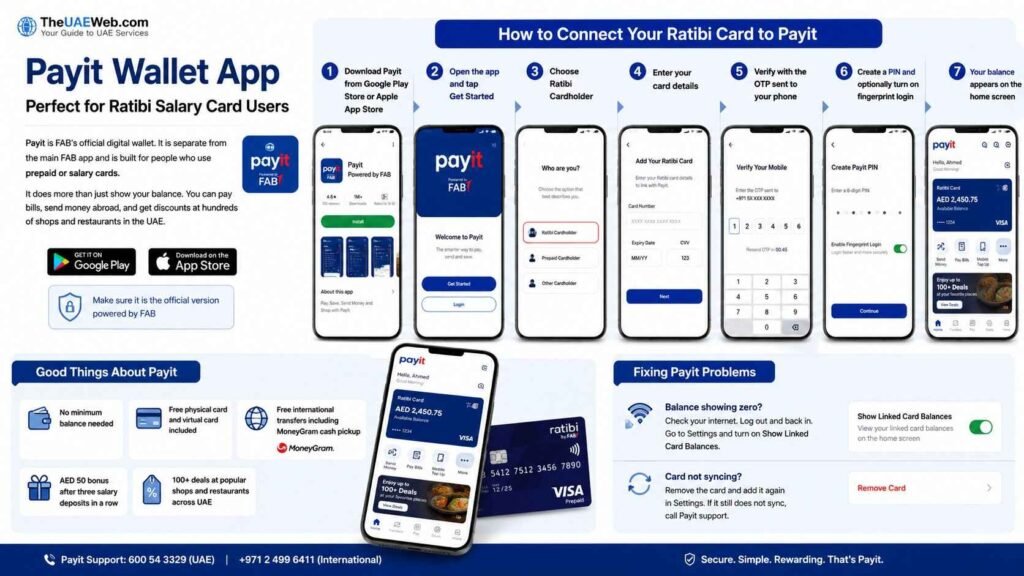
Payit is a digital wallet powered by FAB and designed especially for users who want easier access to their prepaid and salary card services. It works separately from the main FAB Mobile App and provides a simple way to view your available balance directly from your smartphone.
Besides checking your balance, Payit allows users to handle everyday financial activities such as:
- Sending money
- Paying bills
- Managing card activity
- Making digital payments
- Accessing offers and discounts across the UAE
For many Ratibi card users, Payit provides a more flexible way to manage salary funds without depending only on ATMs or traditional banking methods.
How to Link Your Ratibi Card With Payit App
To check your FAB Ratibi card balance through Payit, you first need to connect your card with the app.
Follow these steps:
- Download the official Payit Wallet App from your device’s app store
- Make sure you are downloading the official FAB-powered Payit application
- Open the app and select Get Started
- Choose the Ratibi Cardholder option
- Enter your Ratibi card details
- Verify your mobile number using the OTP sent to your registered phone
- Create your Payit PIN for secure access
- Enable fingerprint or face login if available
- Your Ratibi card balance will appear on the home screen
Once connected, you can check your available balance anytime from your phone.
FAB Balance Check Through IVR Phone Banking
If you prefer checking your FAB balance by phone instead of using an app or website, FAB’s automated phone banking system (IVR) provides another option.
This method is useful for customers who:
- Do not use mobile banking apps
- Have limited internet access
- Need help with account or card-related questions
The automated system guides you through different options and provides balance information after verification.
Steps to Check FAB Balance Through Phone Banking
- Call FAB customer service using the official phone banking number
- Select your preferred language from the available options
- Choose the option related to:
- Account balance
- Card services
- Balance inquiry
- Enter your required verification details, such as:
- Customer ID
- Card number
- Emirates ID details (if requested)
- The IVR system will confirm your details and provide your available balance
- If your issue is more complicated, choose the option to speak with a FAB customer service representative
FAB Customer Service Numbers
FAB Customer Care (UAE): 600 52 5500
International Support: +971 (2) 681 1511
Ratibi Card Support: 600 52 2298
International Ratibi Support: +971 (2) 499 6279
FAB Balance Check Through SMS Banking
Some FAB customers may be able to receive account updates or balance information through SMS services.
SMS banking availability depends on your account type and whether your mobile number is registered with FAB.
Steps to Use FAB SMS Balance Service
- Make sure your mobile number is registered with FAB
- Confirm with FAB whether SMS balance services are available for your account
- Use the official FAB SMS format and number provided by the bank
- Receive a reply message containing your balance information
SMS banking can be useful when you do not have internet access or when you need quick account updates.
Tip: Keep your registered mobile number active so you can receive FAB alerts and verification messages, especially when travelling outside the UAE.
Check FAB Balance by Visiting a FAB Branch
Visiting a FAB branch is the traditional option and can be useful when you need personal assistance or official banking documents.
This method is recommended if:
- Your account access is blocked
- You need a printed statement
- You have a banking issue that cannot be solved online
Steps to Check FAB Balance at a Branch
- Visit the nearest FAB branch
- Carry your Emirates ID and FAB card or account details
- Take a queue number if required
- Request a balance inquiry or mini statement from the customer service counter
- The bank representative will verify your details and provide the required information
A branch visit can also help with other services such as updating personal details, solving card issues, or requesting official account documents.
How to Keep Your FAB Account Safe
When checking your FAB balance online, security is important.
Follow these tips:
Never Share OTP
FAB will not require you to share your one-time password with anyone.
Avoid Unofficial Websites
Always use official FAB banking services.
Use Secure Internet
Avoid logging into banking accounts on unknown public networks.
Monitor Transactions
Regularly checking your balance helps you notice unusual activity quickly.
Benefits of Checking FAB Balance Regularly
A simple balance check can improve your financial management.
Benefits include:
- Better spending control
- Easier budgeting
- Quick salary confirmation
- Reduced payment problems
- Better awareness of your finances
For UAE residents managing monthly expenses, knowing your available balance is an important financial habit.
Common FAB Balance Check Problems and Solutions
I Forgot My FAB Online Banking Password
Use the official password recovery process to reset access.
My FAB App Is Not Working
Try:
- Updating the app
- Checking your internet connection
- Restarting your device
My Balance Is Different From Expected
Check recent transactions and pending payments.
I Cannot Access My Account
Contact FAB support for assistance.
Why Is My FAB Balance Not Showing?
Sometimes customers check their balance and notice something is different from what they expected.
Common reasons include:
Recent Transaction Delay
A payment or transfer may still be processing.
Examples:
- Card purchase
- Bank transfer
- Cash withdrawal
The available balance may update after processing is completed.
Salary Not Credited Yet
If you are waiting for your salary, the payment may not have been processed by the employer yet.
Check:
- Payroll status with your company
- Salary processing date
Incorrect Login Details
If you cannot access online banking, incorrect details may prevent login.
Use official recovery options instead of trying multiple incorrect attempts.
Card or Account Issue
Sometimes technical issues or account restrictions can affect balance visibility.
In this situation, contacting FAB support is the best option.
Frequently Asked Questions About FAB Balance Check UAE
How can I check my FAB account balance online?
You can check your FAB balance by logging into FAB online banking or using the FAB Mobile app.
Can I check FAB balance without visiting a branch?
Yes. You can use digital banking, ATM services, or other available FAB options.
How do I check my FAB balance through mobile?
Download and log into the FAB Mobile app, then select your account to view your balance.
Can I check FAB prepaid card balance?
Yes, eligible prepaid card users can check their balance through available FAB services.
Why is my FAB balance not updated?
It may be due to pending transactions, salary processing delays, or technical issues.
Is FAB balance check available 24 hours?
Digital banking services generally allow customers to check account information anytime.
Can I check FAB balance from ATM?
Yes, you can use a supported ATM for balance inquiry.
Final Thoughts
Checking your FAB balance is a simple step that helps you manage your money better.
Whether you prefer the FAB Mobile app, online banking, ATM, or customer support, there are several ways to know your available funds quickly.
Regular balance checks help you track spending, confirm payments, manage your salary, and avoid unexpected financial issues.
For more UAE banking, finance, business, and lifestyle guides, TheUAEWeb.com provides practical information for residents across the UAE.