FAB Mobile App UAE: Complete Guide to Mobile Banking Features, Registration & Troubleshooting (2026)
The FAB Mobile App UAE is the official mobile banking application from First Abu Dhabi Bank (FAB), designed to help customers manage their finances securely from anywhere. Instead of visiting a branch or ATM for routine banking, users can check account balances, transfer money, pay utility bills, manage credit and debit cards, monitor transactions, and access a wide range of banking services directly from their smartphone.
As one of the UAE’s largest banks, FAB continues to enhance its mobile banking experience with modern security features, faster digital services, and an intuitive interface that makes everyday banking simple for both personal and business customers.
Whether you’ve recently opened a FAB account, received a new debit or credit card, or simply want to make better use of the app’s features, this guide on theuaeweb.com covers everything you need to know. You’ll learn about registration, card activation, key features, troubleshooting common issues, security tips, and answers to frequently asked questions.
Quick Answer
The FAB Mobile App UAE is the official mobile banking application that allows First Abu Dhabi Bank customers to securely manage their accounts, transfer funds, pay bills, activate cards, monitor transactions, and access banking services anytime using their Android or iPhone device.
What Is the FAB Mobile App?
The FAB Mobile App is the official digital banking application offered by First Abu Dhabi Bank. It gives customers secure access to their banking services without needing to visit a branch for everyday tasks.
The app supports a wide range of banking functions, including:
- Checking account balances
- Viewing recent transactions
- Managing savings and current accounts
- Credit card management
- Debit card controls
- Domestic and international transfers
- Utility bill payments
- Loan information
- Investment services (where applicable)
- Secure banking notifications
The application is regularly updated with new features and security improvements to provide a better banking experience for customers across the UAE.
Who Can Use the FAB Mobile App?
The app is available for most FAB customers, including:
- Personal banking customers
- Savings account holders
- Current account holders
- Salary account customers
- Credit card holders
- Debit card holders
- Eligible business customers
- Customers with Islamic banking products (where supported)
To use all available services, customers generally need an active FAB account and a registered mobile number.
Key Features of the FAB Mobile App
The FAB Mobile App combines everyday banking services into one secure platform.
Some of its most useful features include:
| Feature | What You Can Do |
|---|---|
| Account overview | View balances and account details |
| Transaction history | Monitor recent account activity |
| Money transfers | Send money within FAB or to other banks |
| Bill payments | Pay utilities, telecom, and other bills |
| Credit card management | View statements and manage cards |
| Debit card controls | Activate, block, or replace eligible cards |
| Beneficiary management | Add and manage transfer recipients |
| Secure notifications | Receive important banking alerts |
| Profile management | Update selected personal information |
| ATM & branch locator | Find nearby FAB branches and ATMs |
These features allow customers to complete most daily banking activities without visiting a branch.
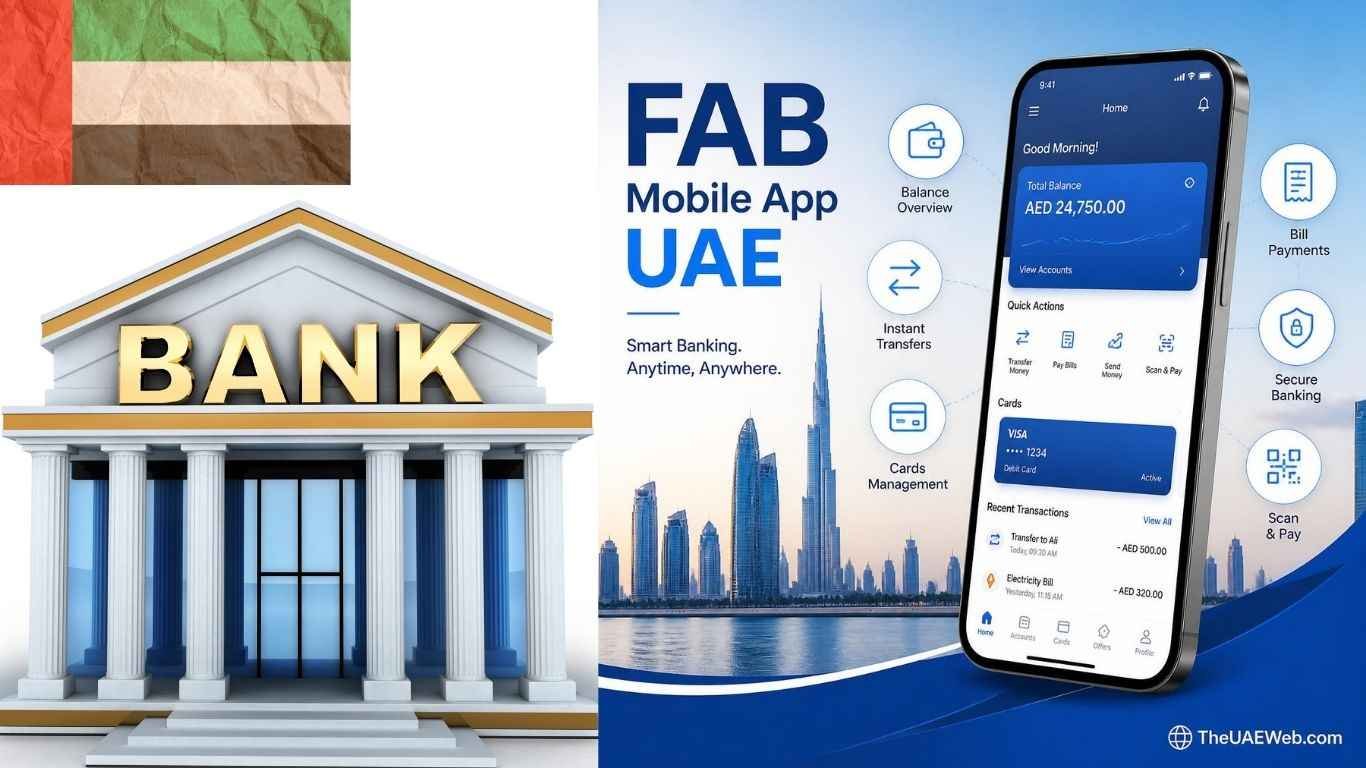
FAB Mobile App Interface
One reason the FAB Mobile App is popular among customers is its clean and user-friendly interface.
After signing in, users typically see an overview of their banking relationship, including accounts, cards, and recent activity.
The interface is designed for quick navigation and commonly includes sections such as:
- Home dashboard
- Accounts
- Cards
- Transfers
- Payments
- Investments
- Services
- Settings
- Notifications
Important banking actions are grouped together, making it easier for customers to complete tasks with fewer steps.
The dashboard also provides quick access to balances, recent transactions, and frequently used banking services.
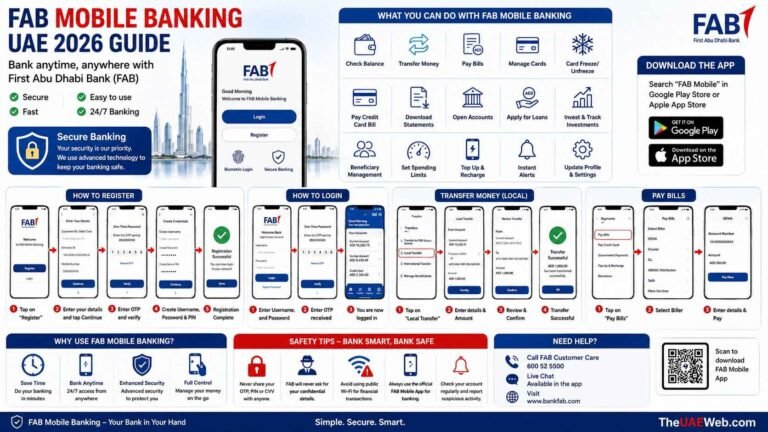
How to Register for the FAB Mobile App
New customers can register for the FAB Mobile App after opening an eligible account with the bank.
The registration process generally involves verifying your identity, linking your account, and creating secure login credentials.
Before registering, ensure you have:
- An active FAB account
- A registered UAE mobile number
- Your Emirates ID (if required)
- Your debit or credit card (where applicable)
- Access to SMS verification
After completing verification, you can securely access mobile banking services from your smartphone.
How to Activate a Card in the FAB Mobile App
If you’ve received a new FAB debit or credit card, activation can usually be completed through the mobile app.
Card activation helps protect your account by ensuring only the authorized cardholder can begin using the card.
Once activated, customers can typically:
- Make purchases
- Withdraw cash from ATMs
- Use contactless payments
- Shop online
- Manage card settings
Depending on the card type, additional verification may be required during activation.
Managing Your FAB Accounts
The mobile app allows customers to monitor multiple banking products from one place.
You can generally manage:
- Current accounts
- Savings accounts
- Salary accounts
- Fixed deposits
- Credit cards
- Financing products
- Investment accounts (where available)
Having everything in one dashboard makes it easier to monitor your financial position throughout the month.
Money Transfers Through the FAB Mobile App
The FAB Mobile App makes transferring money quick and convenient. Whether you need to send funds to another FAB customer, transfer money to another UAE bank, or make an international transfer, the app allows you to complete many transactions without visiting a branch.
Depending on your account type and eligibility, you may be able to:
- Transfer between your own FAB accounts
- Send money to another FAB customer
- Transfer funds to other UAE banks
- Make international remittances
- Save beneficiaries for future transfers
- View transfer history
- Track completed transactions
Before sending money, always double-check the beneficiary’s account details to avoid delays or incorrect transfers.
Bill Payments Made Easy
The FAB Mobile App helps customers pay everyday bills without standing in queues or visiting payment centres.
Eligible customers can manage payments for services such as:
- Electricity bills
- Water bills
- Mobile phone services
- Internet services
- Credit card payments
- Government service payments (where available)
- School or education payments (where supported)
The app also keeps a record of completed transactions, making it easier to track monthly expenses.
Card Management Features
One of the biggest advantages of the FAB Mobile App is the ability to manage your debit and credit cards directly from your smartphone.
Instead of contacting customer support for routine card services, many actions can be completed through the app.
Common card management features include:
- Activate new cards
- Temporarily block or unblock cards
- Report lost or stolen cards
- Replace eligible cards
- View card transactions
- Monitor available credit
- Check payment due dates
- Manage card spending
- Enable or disable international usage (where available)
These tools give customers greater control over their banking security and daily spending.
Security Features of the FAB Mobile App
Security is a major focus of the FAB Mobile App. The bank uses multiple layers of protection to help safeguard customer accounts and personal information.
Some of the security features include:
- Biometric login using fingerprint or Face ID (supported devices)
- One-Time Password (OTP) verification
- Secure login credentials
- Device authentication
- Transaction alerts
- Encrypted communication
- Automatic session timeout
- Fraud monitoring
Customers should always keep their mobile device updated and avoid installing unofficial versions of the app.
Why Is the FAB Mobile App Not Working Today?
Occasionally, customers may experience temporary issues while using the FAB Mobile App. In most cases, these problems are caused by internet connectivity, device settings, scheduled maintenance, or app updates rather than a fault with your account.
Possible reasons include:
- Temporary server maintenance
- Poor internet connection
- Outdated app version
- Incorrect login details
- Device compatibility issues
- Cached app data
- Temporary banking system maintenance
If the app isn’t working, try these steps:
- Check your internet connection.
- Restart your phone.
- Update the app to the latest version.
- Close and reopen the application.
- Clear the app cache (Android).
- Ensure your device software is up to date.
- Wait a few minutes if scheduled maintenance is in progress.
If the problem continues for several hours, contact FAB Customer Care through the bank’s official support channels.
Is the FAB Mobile App Down Today?
Customers sometimes search “Is FAB Mobile App down today?” when they cannot log in or complete transactions.
Temporary service interruptions can happen due to:
- Scheduled maintenance
- System upgrades
- High customer traffic
- Network outages
- Unexpected technical issues
Before assuming the service is unavailable, check:
- Your mobile internet connection
- Wi-Fi connection
- Whether other banking services are working
- If the app requires an update
If many customers are experiencing the same issue, FAB usually works to restore services as quickly as possible.
How to Unlink the FAB Mobile App Without the App
If you’ve changed your phone, lost your device, or no longer have access to the installed application, you may need to remove or unlink the previous mobile device from your banking profile.
Depending on your circumstances, this can typically be handled through FAB’s official customer support or by visiting a branch for identity verification.
Before requesting device removal, keep your identification and account information ready so the bank can verify your identity securely.
Never attempt to remove or change device access using unofficial websites or third-party services.
FAB Mobile App Updates
FAB regularly releases updates to improve performance, security, and customer experience.
Keeping the app updated ensures you benefit from:
- Improved security
- Faster performance
- Bug fixes
- New banking features
- Better compatibility with newer smartphones
- Enhanced user interface
Enable automatic updates through your device’s app store so you always have the latest version.
Tips for Using the FAB Mobile App Safely
Using mobile banking responsibly helps protect your money and personal information.
Follow these best practices:
- Download the app only from the official app store.
- Never share your password or OTP.
- Use biometric login whenever possible.
- Avoid using public Wi-Fi for banking.
- Log out after using the app on shared devices.
- Keep your phone’s operating system updated.
- Enable screen lock protection.
- Report suspicious transactions immediately.
- Never install unofficial banking applications.
Practicing these habits significantly reduces the risk of unauthorized access to your account.
FAB Mobile App vs FAB Online Banking
Both the FAB Mobile App and FAB Online Banking allow customers to manage their accounts digitally, but each is designed for different situations.
The mobile app is ideal for everyday banking on the go, while online banking is often preferred for detailed account management on a desktop or laptop.
| Feature | FAB Mobile App | FAB Online Banking |
|---|---|---|
| Check account balance | ✓ | ✓ |
| View transaction history | ✓ | ✓ |
| Transfer money | ✓ | ✓ |
| Pay utility bills | ✓ | ✓ |
| Manage debit and credit cards | ✓ | ✓ |
| Biometric login | ✓ | No |
| Mobile notifications | ✓ | Limited |
| Access from smartphone | ✓ | Browser only |
| Desktop access | No | ✓ |
| Banking anywhere | Excellent | Good |
Both platforms are secure and synchronized, allowing customers to choose the option that best suits their needs.
Advantages of Using the FAB Mobile App
Mobile banking has become the preferred choice for many UAE residents because it offers convenience and flexibility.
Some of the biggest benefits include:
Bank Anytime, Anywhere
Customers can access their accounts 24 hours a day without visiting a branch.
Save Time
Routine banking tasks such as checking balances, paying bills, and transferring money can be completed in minutes.
Real-Time Notifications
The app can notify users about account activity, card transactions, and important banking updates.
Better Financial Management
Viewing recent transactions and account balances regularly helps customers monitor spending and manage their finances more effectively.
Secure Banking Experience
Multiple security layers help protect customer information while keeping banking services convenient.
Common FAB Mobile App Issues and Solutions
Although the app is generally reliable, users may occasionally experience technical issues.
Unable to Log In
Possible reasons include:
- Incorrect username or password
- Expired login credentials
- Temporary server maintenance
- Poor internet connection
Ensure your credentials are correct and try again after checking your internet connection.
OTP Not Received
If you do not receive your One-Time Password:
- Verify your registered mobile number.
- Check your mobile network signal.
- Wait a few minutes before requesting another OTP.
- Ensure SMS services are active.
App Keeps Crashing
This may happen because:
- The app version is outdated.
- Your phone software needs updating.
- Temporary software bugs.
- Insufficient device storage.
Updating both the app and your phone’s operating system often resolves the issue.
Transactions Are Delayed
Occasionally, transfers or bill payments may take longer to process due to banking system maintenance or additional verification.
Avoid submitting duplicate transactions. Wait for confirmation before attempting another payment.
People Also Ask
What is the FAB Mobile App?
The FAB Mobile App is the official mobile banking application from First Abu Dhabi Bank that allows customers to manage their accounts, transfer money, pay bills, monitor transactions, and control debit and credit cards securely from their smartphones.
How do I register for the FAB Mobile App?
Eligible FAB customers can register after opening an account with the bank. Registration generally requires account verification, a registered UAE mobile number, and identity confirmation before creating secure login credentials.
How do I activate my card in the FAB Mobile App?
After receiving an eligible FAB debit or credit card, customers can usually activate it through the card management section of the mobile app after completing identity verification.
Why is my FAB Mobile App not working today?
The app may not work due to internet connectivity issues, scheduled maintenance, outdated software, incorrect login details, or temporary banking system updates. Restarting your device, updating the app, and checking your internet connection often resolve the problem.
Is the FAB Mobile App down today?
Temporary service interruptions can occur during maintenance or technical upgrades. Before assuming the app is down, verify your internet connection, update the app, and check whether other banking services are working properly.
How do I unlink the FAB Mobile App without the app?
If you’ve lost your phone or no longer have access to the application, contact FAB through its official customer support or visit a branch to request secure device removal after identity verification.
Is the FAB Mobile App safe?
Yes. The app uses multiple security features such as encrypted communication, biometric authentication, OTP verification, secure login credentials, fraud monitoring, and automatic session timeouts to help protect customer accounts.
Can I transfer money using the FAB Mobile App?
Yes. Eligible customers can transfer funds between their own accounts, to other FAB customers, to UAE bank accounts, and in many cases internationally, depending on account eligibility and banking regulations.
Can I pay bills through the FAB Mobile App?
Yes. The app allows eligible customers to pay utility bills, telecom services, credit card bills, and other supported payments directly from their mobile device.
Can I block my FAB debit or credit card using the app?
Yes. The app provides card management features that allow eligible customers to temporarily block cards, report lost cards, monitor transactions, and manage selected card settings.
Conclusion
The FAB Mobile App UAE has transformed everyday banking by giving customers secure access to essential financial services directly from their smartphones. From checking account balances and transferring money to paying bills, activating cards, and managing debit or credit cards, the app helps reduce the need for branch visits while providing a fast and convenient banking experience.
Whether you’re a new FAB customer or a long-time account holder, regularly updating the app, enabling its security features, and following safe mobile banking practices will help you get the most from its services. As FAB continues to expand its digital banking capabilities, the mobile app remains one of the easiest ways to manage your finances anytime and anywhere in the UAE.
For more UAE banking guides, finance tips, and digital service tutorials, visit TheUAEWeb.com, where we publish accurate, practical, and regularly updated content to help residents make informed financial decisions.
Safety Note: TheUAEWeb.com is an independent informational website and is not affiliated with First Abu Dhabi Bank (FAB). Never share your password, PIN, One-Time Password (OTP), CVV, debit or credit card details, or mobile banking credentials with anyone. Always download the FAB Mobile App from the official app stores and verify that you are using official FAB channels before entering sensitive information.