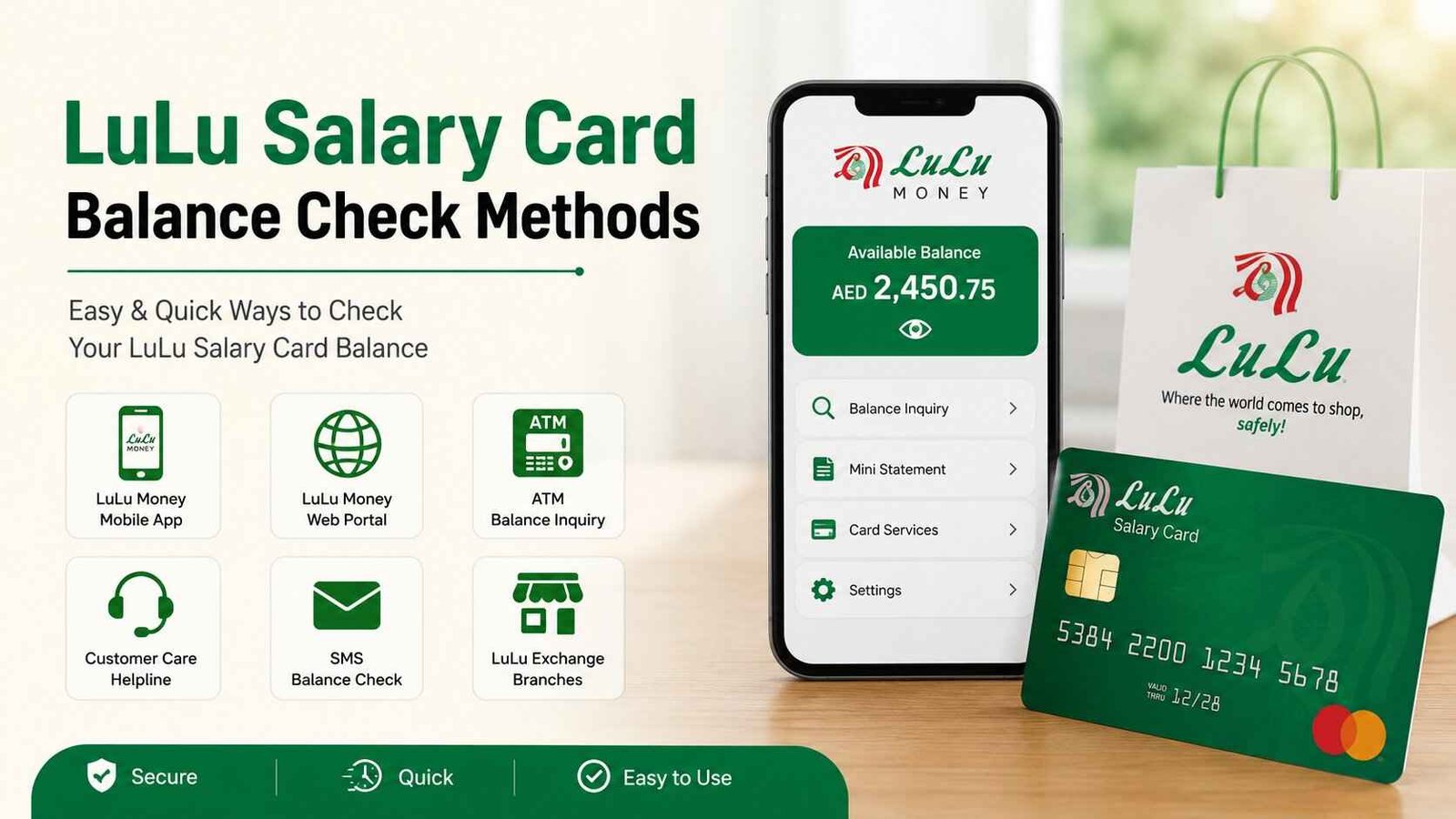
LuLu Salary Card Balance Check UAE 2026: Check Your Salary Online, App, ATM & SMS
Managing your monthly salary becomes much easier when you can check your available balance anytime. Whether you’re waiting for your employer to credit your salary, planning to send money home, withdrawing cash from an ATM, or shopping for everyday essentials, knowing your available balance helps you manage your finances with confidence.
The LuLu Salary Card is widely used by companies across the UAE to pay employees through the Wage Protection System (WPS). Instead of opening a traditional bank account, many workers receive their monthly salaries directly on a LuLu Salary Card, making it simple to access wages, withdraw cash, make purchases, and track spending.
The good news is that checking your salary card balance is quick and convenient. Depending on your preference, you can check your balance through the official LuLu Exchange website, the LuLu Money App, compatible ATMs, SMS services, customer support, or by visiting a LuLu Exchange branch.
Safety Note: Use only your card issuer’s official app, website, ATM, SMS, or customer service to check your balance. Never share your PIN, OTP, CVV, password, or full card details, and avoid entering them on unofficial sites.
Need to check your salary card balance right now?
Many UAE residents search for questions such as:
- How do I check my LuLu Salary Card balance online?
- How can I know if my salary has been credited?
- Which app is used for LuLu Salary Card balance check?
- Can I check my salary card balance without internet?
- Why is my salary not showing on my LuLu Salary Card?
In this complete guide, TheUAEWeb.com explains every LuLu Salary Card balance check method in simple language, including step-by-step instructions, troubleshooting tips, and practical advice to help you access your salary quickly and securely.
What Is a LuLu Salary Card?
A LuLu Salary Card is a prepaid payroll card issued through LuLu Exchange that allows employers in the UAE to pay employees electronically under the Wage Protection System (WPS).
Instead of depositing salaries into a traditional bank account, employers transfer wages directly to the employee’s salary card. Once the salary has been credited, employees can use the card to withdraw cash, make purchases at retail stores, pay online where accepted, and manage their everyday expenses.
The LuLu Salary Card is particularly popular among workers who do not maintain a regular bank account but still need a secure and convenient way to receive their monthly salary.
Depending on your card type, you may also be able to monitor your balance online, through the LuLu Money App, at compatible ATMs, or by using other official balance enquiry services.
Checking your balance regularly helps you confirm salary deposits, avoid declined transactions, and keep track of your monthly spending without waiting until you reach an ATM.
Why Should You Check Your LuLu Salary Card Balance Regularly?
Checking your LuLu Salary Card balance isn’t just about seeing how much money is available. It also helps you confirm that your salary has been credited on time, monitor your spending, and identify any unexpected transactions before they become bigger problems.
Many employees in the UAE make it a habit to check their balance as soon as payday arrives. It only takes a minute and gives peace of mind that the salary has been successfully transferred by the employer.
Regular balance checks can help you:
- Confirm your monthly salary has been deposited.
- Avoid declined purchases due to insufficient funds.
- Plan your monthly budget more effectively.
- Keep track of withdrawals and card transactions.
- Detect unauthorized transactions early.
- Check your balance before sending money abroad or withdrawing cash.
Making balance enquiries a regular habit can help you manage your finances more confidently throughout the month.
Method 1: Check LuLu Salary Card Balance Online
The official LuLu Exchange website provides one of the quickest ways to check your salary card balance. If you have internet access, you can view your available balance within a few minutes without visiting an ATM or branch.
This method is suitable for employees who want to verify whether their salary has been credited or simply check their remaining balance before making a purchase.
Before You Start
Keep the following information ready before beginning the balance enquiry:
- Your LuLu Salary Card
- Card number
- Registered mobile number (if verification is required)
- A secure internet connection
For your security, always use the official LuLu Exchange website and avoid entering your card details on unknown websites.
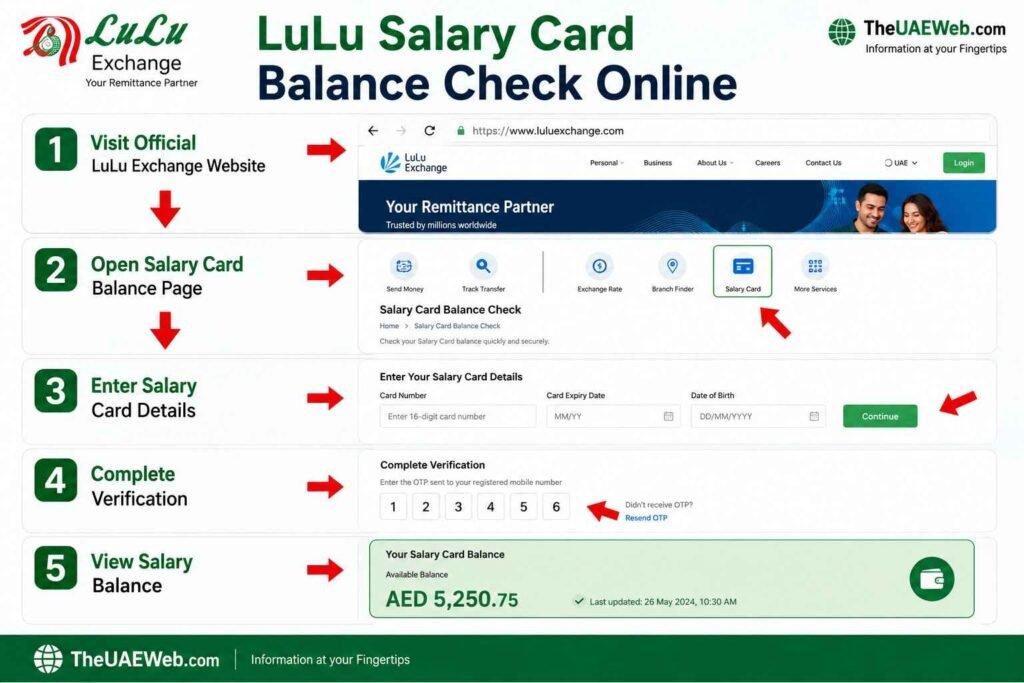
Steps to Check Your LuLu Salary Card Balance Online
Step 1: Visit the Official LuLu Exchange Website
Open your preferred web browser and visit the official LuLu Exchange website.
Look for the salary card or balance enquiry section.
Step 2: Open the Balance Inquiry Page
Navigate to the page where salary card holders can check their available balance.
The page may ask you to verify your identity before continuing.
Step 3: Enter Your Salary Card Details
Carefully enter the required information, which may include:
- Salary Card Number
- Card ID
- Other requested verification details
Double-check all information before submitting your request.
Step 4: Complete the Security Verification
If a CAPTCHA or security verification appears, complete it to confirm you’re accessing the system securely.
Step 5: View Your Salary Card Balance
Click the Check Balance or Submit button.
Within a few seconds, your available salary balance will appear on the screen. Depending on your card type, you may also see recent salary credits and transaction history.
Benefits of Checking Your Salary Card Balance Online
Online balance enquiries have become the preferred choice for many employees because they are quick, secure, and available almost anytime.
Some of the biggest advantages include:
- No need to visit a LuLu Exchange branch.
- Check your salary from home or work.
- Available 24 hours a day in most cases.
- Helps confirm salary deposits instantly.
- Easy to use on both mobile phones and computers.
- Saves time compared to visiting an ATM.
If you regularly receive your salary through a LuLu Salary Card, online balance checking is one of the fastest ways to know when your salary has arrived.
Common Problems During Online Balance Check
Although the online balance enquiry service is easy to use, you may occasionally experience technical issues.
Salary Balance Not Showing
If your balance hasn’t updated yet, your employer’s salary file may still be processing. Wait a short time and check again before contacting support.
Invalid Card Number
An incorrect card number is one of the most common reasons for failed balance enquiries.
Always check your card details carefully before submitting the form.
Website Isn’t Loading
This could be caused by:
- Poor internet connection
- Browser issues
- Temporary maintenance
Refresh the page or try using another browser or device.
Verification Failed
If the security verification doesn’t work, refresh the page and complete the verification again before submitting your request.
For most users, checking their LuLu Salary Card balance online is the fastest way to confirm that their salary has been credited without needing to visit an ATM or LuLu Exchange branch.
Method 2: Check LuLu Salary Card Balance Using the LuLu Money App
If you frequently use your smartphone to manage your finances, the LuLu Money App is one of the easiest ways to check your LuLu Salary Card balance. Instead of visiting a branch or ATM, you can access your balance, view recent transactions, and confirm salary deposits directly from your mobile device.
The app is designed to give users quick access to their LuLu Exchange services, making it easier to manage money anytime and from anywhere in the UAE.
Why Use the LuLu Money App?
The LuLu Money App offers much more than just balance enquiries. Once your account is set up, you can manage several financial services from a single platform.
Some of the main features include:
- Check your salary card balance instantly
- View recent salary deposits
- Monitor transaction history
- Send money internationally
- Pay bills (where available)
- Receive payment notifications
- Manage your LuLu Money account securely
For employees who receive their salary every month through a LuLu Salary Card, the app provides one of the fastest ways to confirm that their salary has been credited.
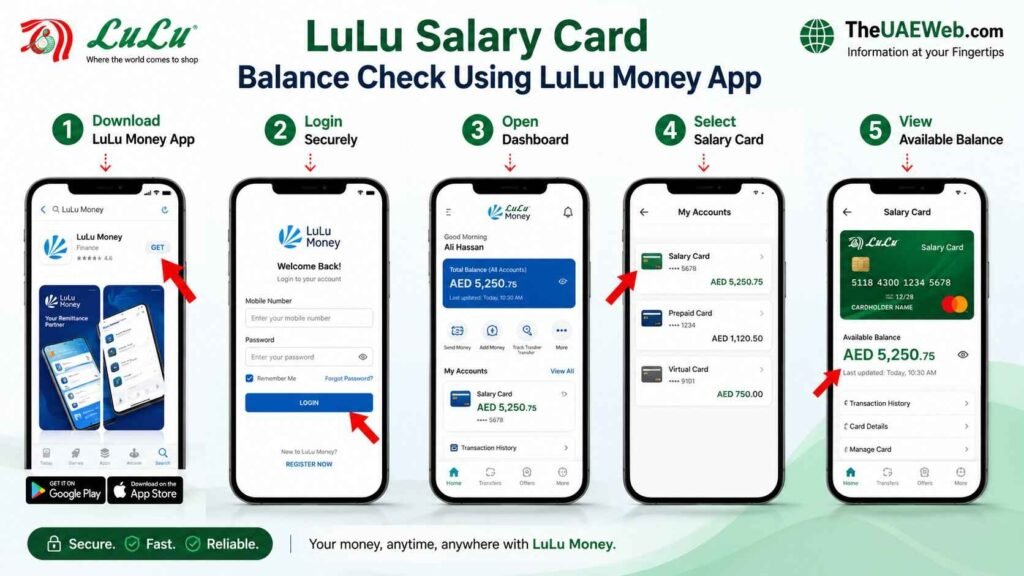
How to Check Your LuLu Salary Card Balance Using the App
Follow these simple steps to check your balance.
Step 1: Download the Official LuLu Money App
Download the LuLu Money App from the Google Play Store or Apple App Store.
Always install the official application published by LuLu Exchange to keep your personal information secure.
Step 2: Sign In to Your Account
Open the app and log in using your registered mobile number or email address.
If you’re using the app for the first time, complete the registration process by verifying your identity.
Step 3: Open the Dashboard
After signing in, you’ll be taken to the home screen where your linked accounts and services are displayed.
Step 4: Select Your Salary Card
Tap on your LuLu Salary Card or linked wallet to open the account details.
Step 5: View Your Available Balance
Your current salary card balance will appear on the screen. You can also review your recent salary credits, purchases, ATM withdrawals, and other transactions.
Benefits of Using the LuLu Money App
More employees are choosing the mobile app because it offers convenience and real-time account access.
Some key benefits include:
- Check your salary anytime, anywhere.
- No need to visit an ATM or branch.
- View salary deposits instantly.
- Access transaction history in one place.
- Receive notifications for account activity.
- Secure login with PIN or biometric authentication (if supported).
Whether you’re waiting for your monthly salary or tracking your daily spending, the app makes managing your finances much easier.
Common LuLu Money App Problems and Solutions
While the app is generally reliable, users may occasionally experience technical issues. Fortunately, most of these problems can be fixed within a few minutes.
Unable to Log In
If you cannot access your account:
- Check your internet connection.
- Make sure you’re entering the correct login details.
- Reset your password if necessary.
Salary Balance Not Updated
If your salary has been processed but isn’t showing yet, refresh the app or sign out and log back in.
Sometimes salary updates take a little time to appear depending on processing schedules.
App Keeps Crashing
If the app closes unexpectedly:
- Update it to the latest version.
- Restart your phone.
- Clear the application cache.
- Reinstall the app if the issue continues.
OTP Not Received
If you don’t receive the verification code:
- Confirm that your registered mobile number is active.
- Wait a few minutes before requesting another OTP.
- Check your network signal.
- Make sure SMS messages are not blocked on your phone.
Can You Confirm Your Salary Deposit Through the LuLu Money App?
Yes. One of the biggest advantages of the LuLu Money App is that it allows you to quickly confirm whether your latest salary has been credited.
Instead of travelling to an ATM or branch on payday, simply log in to the app and review your available balance and recent transaction history. If your employer has already processed the payment, it will usually appear in your account, allowing you to verify your salary within seconds.
For many employees across the UAE, this has become the preferred way to check salary payments because it’s fast, convenient, and available whenever they need it.
Method 3: Check LuLu Salary Card Balance at an ATM
If you don’t have internet access or prefer checking your balance in person, using an ATM is one of the easiest and most reliable methods. Most LuLu Salary Cards can be used at compatible ATMs across the UAE, allowing you to check your available balance before withdrawing cash.
Many employees choose this method on payday because they can verify their salary and withdraw money during the same visit.
Before Visiting an ATM
Before checking your balance, make sure you have:
- Your LuLu Salary Card
- Your card PIN
- Access to a compatible ATM
For your security, always use ATMs located in well-lit and secure places, such as shopping malls, banks, or LuLu Hypermarket locations where available.
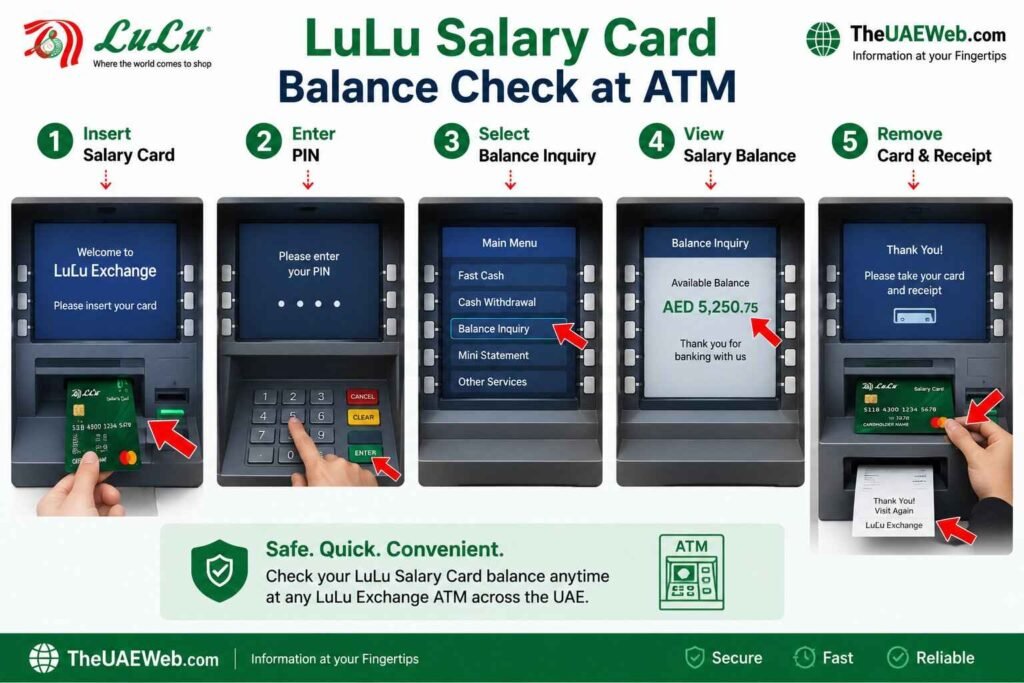
Steps to Check Your LuLu Salary Card Balance at an ATM
Step 1: Insert Your LuLu Salary Card
Insert your salary card into a compatible ATM with the chip facing the correct direction.
Wait for the machine to read your card before continuing.
Step 2: Enter Your PIN
Carefully enter your four-digit PIN.
Always cover the keypad while entering your PIN to prevent anyone from seeing your security code.
Step 3: Select “Balance Inquiry”
After logging in, the ATM menu will display several banking options.
Choose Balance Inquiry to view your available salary balance.
Step 4: View Your Available Balance
Within a few seconds, your current account balance will appear on the screen.
Many ATMs also give you the option to print a receipt showing your available balance.
Step 5: Remove Your Card
After completing your balance enquiry, remove your salary card and collect your receipt if you requested one.
Always make sure you take your card before leaving the ATM.
Benefits of Using an ATM for Salary Balance Checks
ATM balance enquiries remain popular because they’re simple and don’t require internet access.
Some advantages include:
- Available at thousands of ATM locations across the UAE
- No mobile app or website required
- Check your balance before withdrawing cash
- Instant results
- Printed receipt available on many ATMs
If you’re planning to withdraw your salary immediately after it’s credited, checking your balance first helps you avoid declined withdrawals.
ATM Balance Check Tips
To make your ATM experience safer and smoother, follow these simple tips:
- Use ATMs operated by trusted banks whenever possible.
- Never share your PIN with anyone.
- Avoid accepting help from strangers.
- Collect your receipt before leaving.
- If the ATM appears damaged or suspicious, use another machine.
Checking your salary balance before making a withdrawal also helps you confirm that your employer has successfully deposited your wages.
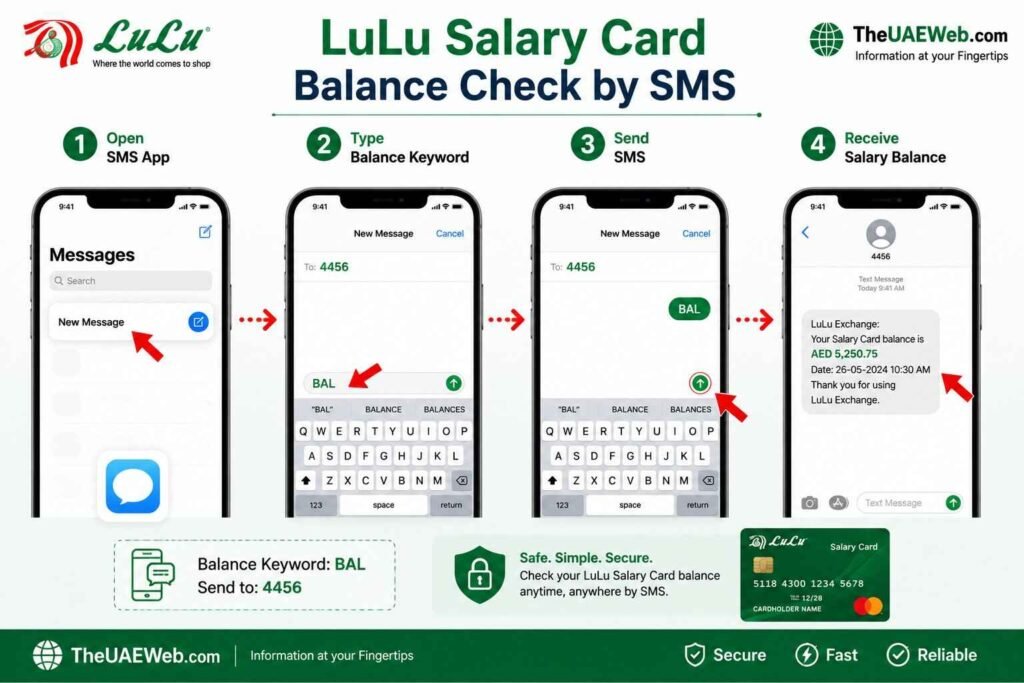
Method 4: Check LuLu Salary Card Balance by SMS
If you don’t have a smartphone or internet connection, SMS balance enquiry can be a useful alternative. Depending on your LuLu Salary Card and the services available for your account, you may be able to receive your balance through a simple text message.
This method is particularly useful for employees working in remote locations where internet access may be limited.
Before Using SMS Balance Enquiry
Before sending an SMS request, make sure:
- Your mobile number is registered with LuLu Exchange.
- SMS balance enquiry is available for your salary card.
- You know the correct SMS format provided by LuLu Exchange.
Some services may vary depending on the card issuer and your employer.
Steps to Check Your Salary Card Balance by SMS
Step 1: Open Your Phone’s Messaging App
Launch the SMS application on your mobile phone.
Step 2: Type the Required Balance Enquiry Format
Enter the balance enquiry keyword provided by LuLu Exchange.
Some salary card services may use a format similar to:
BAL XXXX
where XXXX represents the last four digits of your salary card.
Always follow the latest instructions provided by LuLu Exchange, as the SMS format may change.
Step 3: Send the SMS
Send the message using the mobile number registered with your salary card.
Step 4: Receive Your Balance
If the service is available, you’ll receive a reply containing your available salary balance and, in some cases, recent account information.
Advantages of SMS Balance Enquiry
Although mobile apps are becoming more popular, SMS balance checks still offer several benefits.
These include:
- No internet required
- Works on most mobile phones
- Fast balance confirmation
- Helpful while travelling
- Convenient for basic phones without apps
If your salary has just been credited and you don’t have internet access, SMS can provide a quick way to verify your available balance.
Method 5: Check LuLu Salary Card Balance Through Customer Support
If you’re unable to check your balance online, through the LuLu Money App, SMS, or an ATM, you can contact LuLu Exchange Customer Support for assistance. This method is especially useful if you’re experiencing account-related issues or need help verifying a recent salary payment.
Customer support representatives can assist with balance enquiries after confirming your identity and can also help resolve card-related problems.
When Should You Contact Customer Support?
You should consider contacting customer support if:
- Your salary has not been credited.
- Your card is blocked or temporarily suspended.
- You forgot your PIN.
- Your balance appears incorrect.
- An ATM declined your transaction.
- Your salary card is lost or damaged.
- You’re unable to log in to your account.
Steps to Check Your Salary Card Balance Through Customer Support
Step 1: Contact LuLu Exchange
Call the official LuLu Exchange customer support team or visit your nearest branch if you need in-person assistance.
Step 2: Verify Your Identity
For security reasons, the customer service representative will ask you to verify your identity.
Keep the following details ready:
- Emirates ID
- LuLu Salary Card
- Registered mobile number
- Passport (if requested)
Step 3: Request a Balance Enquiry
Inform the representative that you would like to check your LuLu Salary Card balance.
If you’re calling because your salary hasn’t been received, mention your expected salary date and any recent transactions.
Step 4: Receive Your Balance Information
After your identity has been verified, the representative will provide your available balance and help answer any questions regarding your salary or account.
If there’s an issue with your salary payment, they may also guide you on the next steps.
Method 6: Visit a LuLu Exchange Branch
If you prefer face-to-face assistance or your balance enquiry cannot be completed through other methods, visiting a LuLu Exchange branch is another reliable option.
Branch staff can help you check your available balance, verify salary deposits, replace damaged cards, reset your PIN, and resolve account-related issues.
This method is particularly helpful for users who are not comfortable using online services or who require official assistance.
When Should You Visit a Branch?
A branch visit is recommended if:
- Your salary hasn’t been credited after the expected date.
- Your salary card has been blocked.
- Your card has expired or is damaged.
- You need a replacement card.
- You want a printed account statement.
- You’re unable to verify your balance using other methods.
Steps to Check Your Salary Card Balance at a Branch
Step 1: Visit the Nearest LuLu Exchange Branch
Go to your nearest LuLu Exchange branch during working hours.
To save time, check the branch timings before you travel.
Step 2: Bring the Required Documents
Carry the following documents with you:
- Emirates ID
- LuLu Salary Card
- Passport (if requested)
These documents help the staff verify your identity quickly.
Step 3: Take a Queue Token
Most branches use a queue management system.
Collect your token and wait until your number is called.
Step 4: Request a Balance Check
Ask the customer service representative to check your LuLu Salary Card balance or provide a mini statement.
Step 5: Verify Your Identity
The representative may ask you to confirm your personal information before accessing your account.
Step 6: Receive Your Balance
After verification, your current balance will be provided.
If needed, you can also request a printed balance slip or account statement.
How to Check If Your Salary Has Been Credited
One of the most common reasons employees perform a LuLu Salary Card balance check is to confirm whether their monthly salary has been deposited.
Instead of waiting for a notification from your employer, you can verify your salary yourself using several methods.
Here are the easiest ways to confirm a salary credit:
- Check your available balance through the LuLu Money App.
- Review your recent transaction history online.
- Perform a balance enquiry at a compatible ATM.
- Contact LuLu Exchange customer support.
- Visit a LuLu Exchange branch if you need confirmation.
If your balance has increased by the amount of your monthly salary or a new salary transaction appears in your account history, your salary has been successfully credited.
However, if the expected salary isn’t showing, don’t panic. Salary transfers may sometimes be delayed due to payroll processing, weekends, public holidays, or banking settlement times.
My Salary Hasn’t Been Credited — What Should I Do?
If payday has passed but your LuLu Salary Card balance hasn’t changed, there are several things you should check before reporting a problem.
First, wait a little while. Many employers process salaries in batches, and it may take a few hours for the payment to appear.
If your salary is still missing, follow these steps:
- Check your balance again using another method, such as the LuLu Money App or an ATM.
- Review your recent transaction history to make sure the payment hasn’t already been received.
- Contact your employer or HR department to confirm that the salary has been processed.
- Verify that your salary card is active and hasn’t expired.
- Contact LuLu Exchange customer support if the payment still isn’t visible after your employer confirms it has been sent.
In many cases, salary delays are caused by payroll processing schedules rather than problems with your salary card itself. Waiting a short time and checking again often resolves the issue.
Common LuLu Salary Card Balance Check Problems and Solutions
Most LuLu Salary Card users won’t experience issues when checking their balance, but occasional technical problems can happen. The good news is that many of these can be resolved quickly without visiting a branch.
Here are some of the most common problems and their solutions.
My Balance Shows Zero
If your balance is showing AED 0 even though you’re expecting your salary, don’t panic immediately.
This could happen because:
- Your employer hasn’t processed the salary yet.
- The salary is still being transferred through the Wage Protection System (WPS).
- There is a temporary system delay.
- You’re checking the wrong salary card.
Wait for some time and check your balance again using another method, such as the LuLu Money App or an ATM. If your employer confirms the salary has already been transferred but it still doesn’t appear, contact LuLu Exchange customer support.
Invalid Card Number
If the website or mobile app displays an error saying your card number is invalid, carefully check the information you entered.
Make sure:
- The card number is correct.
- You haven’t entered extra spaces.
- You’re using the correct LuLu Salary Card.
Even a small typing mistake can prevent the system from retrieving your account information.
LuLu Money App Isn’t Working
If the LuLu Money App keeps crashing or doesn’t open properly, try the following:
- Update the app to the latest version.
- Restart your smartphone.
- Clear the app cache.
- Sign out and log in again.
- Reinstall the application if necessary.
If the problem continues, contact customer support for assistance.
ATM Doesn’t Display My Balance
Sometimes an ATM may not be able to retrieve your account information.
Possible reasons include:
- Temporary network issues.
- The ATM doesn’t support your card.
- Your card chip isn’t reading correctly.
- The ATM is temporarily offline.
Try using another compatible ATM before assuming there’s an issue with your salary card.
OTP Not Received
If you’re trying to log in but haven’t received the verification code:
- Make sure your registered mobile number is active.
- Check your network coverage.
- Wait a few minutes before requesting another OTP.
- Restart your phone if necessary.
If you still don’t receive the OTP, contact LuLu Exchange to confirm your registered mobile number.
Salary Is Less Than Expected
If your available balance is lower than expected, don’t immediately assume there’s a mistake.
First:
- Check your recent transaction history.
- Confirm your salary amount with your employer.
- Verify whether any deductions were made.
- Review any recent ATM withdrawals or purchases.
If the balance still appears incorrect after checking these details, contact your employer or LuLu Exchange for clarification.
Tips to Keep Your LuLu Salary Card Secure
Your LuLu Salary Card contains your monthly income, so protecting it should always be a priority. Following a few simple security practices can help reduce the risk of fraud and unauthorized transactions.
Here are some important safety tips:
- Never share your PIN or OTP with anyone.
- Only use the official LuLu Exchange website and LuLu Money App.
- Avoid checking your balance on public Wi-Fi networks.
- Cover the keypad whenever you enter your PIN at an ATM.
- Enable account notifications whenever available.
- Check your balance regularly to identify any unusual activity.
- Keep your registered mobile number updated.
- Report a lost or stolen salary card immediately.
Developing these habits will help keep your salary and personal information secure.
Which LuLu Salary Card Balance Check Method Is Best?
There are several ways to check your LuLu Salary Card balance, and each method has its own advantages. The best option depends on where you are and how quickly you need your balance information.
| Method | Internet Required | Available 24/7 | Best For |
|---|---|---|---|
| Official Website | Yes | Yes | Fast online balance checks |
| LuLu Money App | Yes | Yes | Daily salary tracking |
| ATM | No | Yes | Balance enquiry before cash withdrawal |
| SMS | No | Depends on service | Basic mobile phones |
| Customer Support | No | Working hours | Account issues and balance verification |
| LuLu Exchange Branch | No | Branch hours | Personal assistance and printed statements |
For most employees in the UAE, the LuLu Money App remains the most convenient option because it provides real-time balance updates, transaction history, and salary notifications directly on your smartphone. If internet access isn’t available, ATM balance enquiries and customer support continue to be reliable alternatives.
Frequently Asked Questions
How can I check my LuLu Salary Card balance online?
You can check your LuLu Salary Card balance by visiting the official LuLu Exchange website or using the LuLu Money App. After entering your account details and completing the verification process, your available balance will be displayed.
Can I check my LuLu Salary Card balance without internet?
Yes. If internet access isn’t available, you can check your balance at a compatible ATM, through SMS services (if supported), by contacting LuLu Exchange customer support, or by visiting a nearby branch.
Which app is used for LuLu Salary Card balance check?
The official LuLu Money App allows users to check salary card balances, review transaction history, monitor salary deposits, and manage other LuLu Exchange services.
How do I know if my salary has been credited?
You can confirm your salary by checking your available balance, reviewing recent transactions in the LuLu Money App, using an ATM, or contacting LuLu Exchange customer support.
Why is my LuLu Salary Card showing zero balance?
A zero balance may occur if your salary hasn’t been processed yet, there’s a temporary system delay, or you’re checking the account before your employer has completed the payroll transfer.
Can I withdraw cash immediately after my salary is credited?
Yes. Once your salary appears on your LuLu Salary Card, you can usually withdraw cash from compatible ATMs, subject to your card’s withdrawal limits.
What should I do if I lose my LuLu Salary Card?
Report the lost card to LuLu Exchange immediately to block unauthorized use. You should also request a replacement card as soon as possible.
Is there a fee for checking my LuLu Salary Card balance?
Online balance enquiries and mobile app checks are generally free. Some ATM operators may charge a fee depending on the machine you use, so it’s always a good idea to review any on-screen messages before proceeding.
Final Thoughts
Regularly checking your LuLu Salary Card balance helps you stay informed about your salary deposits, monitor your spending, and avoid unexpected payment issues. Whether you prefer using the official LuLu Exchange website, the LuLu Money App, an ATM, SMS services, customer support, or visiting a branch, there are several convenient ways to access your balance whenever you need it.
For most users, the LuLu Money App offers the quickest and most convenient experience, while ATM and branch services remain excellent alternatives for those without internet access. By checking your balance regularly and following the security tips in this guide, you can manage your salary with greater confidence and peace of mind.
At TheUAEWeb.com, we’re committed to publishing practical UAE banking guides, salary card tutorials, and easy-to-follow financial resources that help residents find accurate information quickly. Explore our latest articles for more helpful guides on UAE banking, balance checks, digital wallets, and everyday financial services.