PayPlus Card: Complete Guide to Balance Check, Online Access & Al Ansari vs FAB PayPlus
If you’ve recently received your salary through a PayPlus Card, you may be wondering how to check your balance, withdraw cash, use the card for shopping, or even identify which type of PayPlus card you have. Many employees in the UAE search for terms like PayPlus card balance check, PayPlus balance inquiry, or PayPlus salary check, only to discover that there are actually two different PayPlus products available.
One is the Al Ansari PayPlus Card, a prepaid salary card issued through Al Ansari Exchange in partnership with First Abu Dhabi Bank (FAB). The other is FAB PayPlus, a digital salary account managed through the Payit app. Although both products share the PayPlus name and are designed for salary payments under the UAE’s Wage Protection System (WPS), they work differently and offer different features.
This comprehensive guide explains everything you need to know about PayPlus in the UAE. You’ll learn how to identify your PayPlus product, check your balance using different methods, understand fees and limits, compare Al Ansari PayPlus with FAB PayPlus, and find answers to the most common questions. Whether you’re a new cardholder or simply looking for the fastest balance check method, this guide from TheUAEWeb.com will help you use your PayPlus account with confidence.
Quick Answer: How to Check Your PayPlus Card Balance
If you’re looking for the quickest way to check your PayPlus balance, use the method that matches your card type.
| PayPlus Product | Balance Check Methods |
|---|---|
| Al Ansari PayPlus Card | Al Ansari Exchange App, SMS, Visa ATM, Al Ansari branch, online services (where available) |
| FAB PayPlus | Payit App, FAB digital services, ATM, SMS notifications |
Before checking your balance, make sure you know whether you have an Al Ansari PayPlus Card or FAB PayPlus, as each uses different apps and account services.
What Is a PayPlus Card?
A PayPlus Card is a salary payment solution designed for employees in the UAE whose salaries are processed through the Wage Protection System (WPS). Instead of receiving a traditional bank account, many workers receive their salary through a PayPlus product that allows them to withdraw cash, make purchases, and manage their salary conveniently.
Depending on your employer and salary provider, your PayPlus service may be offered by Al Ansari Exchange or First Abu Dhabi Bank (FAB).
The primary purpose of PayPlus is to make salary payments faster, safer, and more accessible, especially for employees who may not have a conventional bank account.
With a PayPlus product, users can generally:
- Receive monthly salary payments.
- Check their available balance.
- Withdraw cash from ATMs.
- Pay for purchases at Visa-accepting merchants.
- View transaction history.
- Transfer funds (depending on the product).
- Manage their account using a mobile application.
While these features sound similar, the experience differs depending on which PayPlus solution you use.
Why Are There Two Different PayPlus Products?
One of the biggest reasons for confusion is that the UAE has two separate PayPlus services operating under similar branding.
Although both are intended to simplify salary payments, they are issued by different providers and have different account structures.
1. Al Ansari PayPlus Card
The Al Ansari PayPlus Card is a prepaid Visa salary card issued by Al Ansari Exchange in partnership with First Abu Dhabi Bank (FAB).
It is commonly provided to employees whose employers use Al Ansari Exchange to process salaries under the Wage Protection System.
Since it is a prepaid salary card, your employer loads your monthly salary directly onto the card. You can then use it for ATM withdrawals, shopping, and balance inquiries without needing a traditional bank account.
Most cardholders manage their account using the Al Ansari Exchange mobile app or by visiting an Al Ansari branch.
2. FAB PayPlus
FAB PayPlus is different from the prepaid salary card.
Instead of functioning solely as a prepaid card, it is a digital salary account offered by First Abu Dhabi Bank through the Payit platform.
Depending on the product version and eligibility, users may receive an IBAN, enabling additional banking features such as digital transfers, salary management, and broader financial services.
FAB PayPlus is designed for users who prefer managing their salary digitally through a mobile application while enjoying many features typically associated with a bank account.
Al Ansari PayPlus vs FAB PayPlus
Although they share the PayPlus name, these products serve different needs.
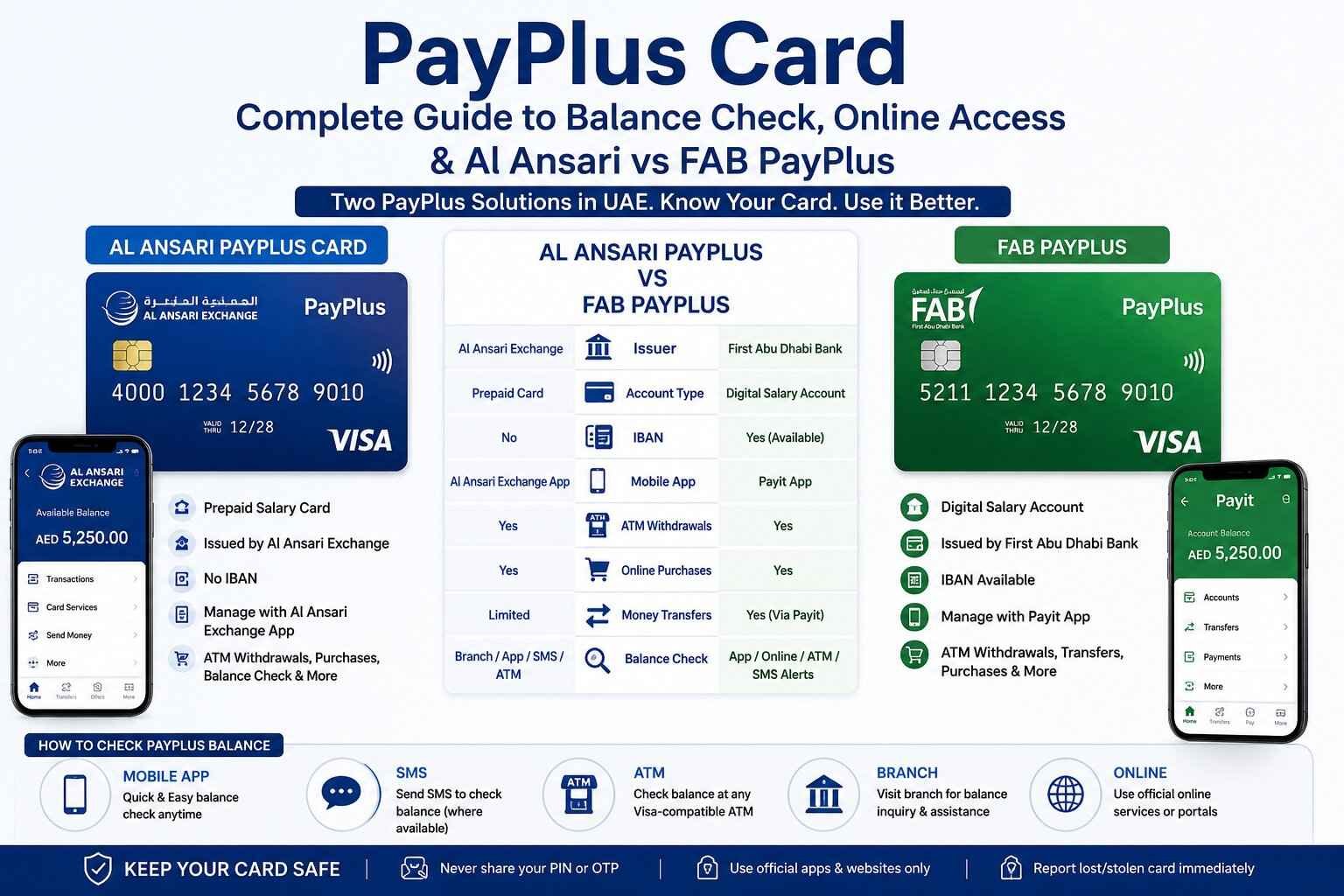
| Feature | Al Ansari PayPlus | FAB PayPlus |
|---|---|---|
| Provider | Al Ansari Exchange | First Abu Dhabi Bank |
| Product Type | Prepaid salary card | Digital salary account |
| Salary Deposit | Yes | Yes |
| Visa Card | Yes | Available with eligible accounts |
| Mobile App | Al Ansari Exchange App | Payit App |
| ATM Withdrawals | Yes | Yes |
| Online Purchases | Yes | Yes |
| Bank Account | No | Digital account |
| IBAN | Usually No | Yes (where applicable) |
| Best For | Employees receiving salaries through Al Ansari Exchange | Users wanting digital banking features alongside salary services |
Choosing between the two is generally not a personal decision, as your employer determines which salary solution is used. However, understanding the differences helps you use the correct app, access the right support channels, and follow the appropriate balance-check process.
Which PayPlus Card Do You Have?
If you’re unsure which PayPlus product you own, there are several easy ways to identify it.
First, check the front of your card. An Al Ansari PayPlus Card typically displays the Al Ansari Exchange branding, while a FAB-issued card will feature First Abu Dhabi Bank branding.
Next, look at the mobile application associated with your account. If your employer instructed you to use the Al Ansari Exchange App, you most likely have an Al Ansari PayPlus Card. If you were asked to use the Payit App, your salary account is likely FAB PayPlus.
You can also refer to your welcome SMS or salary notification. These messages often mention the issuing institution and provide instructions for downloading the appropriate application.
If you’re still uncertain, your employer’s HR department or payroll team can confirm which PayPlus service they use for salary payments.
How to Check Your PayPlus Card Balance
Checking your PayPlus balance is simple once you know which PayPlus product you have. The available methods depend on whether you’re using an Al Ansari PayPlus Card or FAB PayPlus. Both offer convenient ways to view your available salary, recent transactions, and account activity.
Below are the most common balance check methods available in the UAE.
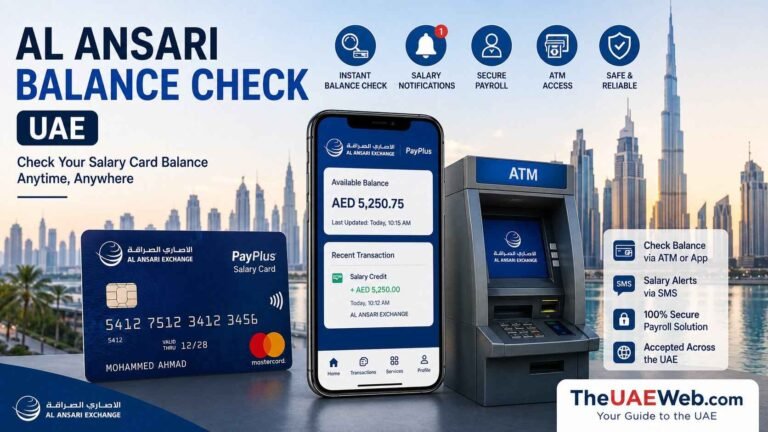
1. Check PayPlus Balance Using the Mobile App
Using the official mobile application is the quickest and most convenient way to check your PayPlus balance.
For Al Ansari PayPlus Card
If you have an Al Ansari PayPlus Card, download the Al Ansari Exchange App from the Google Play Store or Apple App Store.
After signing in, you can:
- View your available balance
- Check recent salary deposits
- Review transaction history
- Monitor card activity
- Access additional card services
The app is available 24 hours a day, making it the preferred method for most users.
For FAB PayPlus
FAB PayPlus users can manage their salary account through the Payit App.
After logging into the app, you’ll be able to:
- View your account balance
- Check salary credits
- Review recent transactions
- Transfer money (where available)
- Manage your account securely
The Payit app also provides additional digital banking features that are not typically available with prepaid salary cards.
2. PayPlus Card Balance Check by SMS
SMS is another convenient option, especially if you don’t have internet access.
For eligible Al Ansari PayPlus Card users, balance enquiries can be made by sending:
BAL to 600 54 6000
If SMS balance enquiries are enabled for your card, you’ll receive a reply showing your available balance.
Some employers may activate SMS salary alerts, allowing you to receive automatic notifications whenever your salary is credited.
FAB PayPlus users may also receive SMS notifications for salary deposits and important account activities, depending on their account settings.
3. PayPlus Balance Check at an ATM
You can also check your available balance at any compatible ATM that accepts Visa cards.
To check your balance:
- Insert your PayPlus card into the ATM.
- Enter your PIN.
- Select Balance Inquiry.
- Wait for your available balance to appear on the screen.
Many users also choose to withdraw cash immediately after checking their balance.
Keep in mind that some ATM operators may charge an additional fee for balance enquiries or cash withdrawals.
4. Visit an Al Ansari Exchange Branch
If you’re an Al Ansari PayPlus cardholder and prefer in-person assistance, you can visit any Al Ansari Exchange branch.
A customer service representative can help you:
- Check your available balance
- Review recent salary deposits
- Resolve card-related issues
- Request a replacement card
- Update your account information
This option is particularly useful if you’ve forgotten your PIN or are experiencing technical issues with your card.
5. Online PayPlus Balance Check
Many users search for PayPlus balance check online hoping to find a dedicated website.
Whether online balance checking is available depends on your PayPlus product.
For Al Ansari PayPlus, account management is primarily handled through the official mobile application and customer service channels.
For FAB PayPlus, users can manage their account through the Payit digital platform and other supported FAB services, depending on their account type.
Always use official channels when accessing your salary information. Avoid entering your card details on unofficial websites or third-party balance-check services.
Common PayPlus Card Fees and Limits
Fees and transaction limits can vary depending on your employer, card programme, and service provider. However, many PayPlus users encounter similar limits for everyday transactions.
The following table provides a general overview.
| Service | Typical Information |
|---|---|
| Salary Deposit | Usually free |
| Balance Inquiry | Free through official app; ATM charges may apply |
| ATM Cash Withdrawal | Fees may apply depending on ATM operator and programme |
| International Transactions | Currency conversion and international fees may apply |
| Replacement Card | May be subject to a replacement fee |
| Daily ATM Withdrawal Limit | Depends on your card programme |
| Maximum Card Balance | Subject to programme limits |
Because employers may choose different PayPlus packages, always refer to your cardholder agreement or official provider for the latest fees and limits.
Can You Use a PayPlus Card for Shopping?
Yes. Most PayPlus cards can be used anywhere Visa is accepted, both in stores and online.
You can use your card to pay for:
- Supermarkets
- Restaurants
- Fuel stations
- Pharmacies
- Shopping malls
- Online stores
- Utility bill payments (where accepted)
Before making a purchase, ensure that you have sufficient available balance.
For online transactions, some merchants may require One-Time Password (OTP) verification for additional security.
Can You Withdraw Your Salary in Cash?
Yes.
One of the main purposes of a PayPlus salary solution is to provide easy access to your wages.
Depending on your PayPlus product, you may withdraw cash through:
- Visa ATMs across the UAE
- Selected exchange houses
- Bank ATMs
- Other approved cash withdrawal locations
Withdrawal limits and applicable fees may vary depending on your card programme and the ATM operator.
Many employees choose to withdraw only part of their salary while leaving the remaining balance on the card for shopping and bill payments.
Is PayPlus a Bank Account?
This is one of the most frequently asked questions.
The answer depends on which PayPlus product you have.
The Al Ansari PayPlus Card is generally a prepaid salary card rather than a traditional bank account. It allows you to receive salary payments and make transactions without opening a standard current or savings account.
On the other hand, FAB PayPlus is designed as a digital salary account that offers additional banking-style features, including digital account management and, for eligible users, an IBAN for transfers.
Understanding this distinction helps explain why the two PayPlus products use different mobile apps, account services, and support channels.
Which PayPlus Product Is Right for You?
In most cases, you won’t choose between Al Ansari PayPlus and FAB PayPlus yourself. Your employer decides which salary solution to use under the UAE’s Wage Protection System (WPS). However, understanding the strengths of each option can help you make the most of the services available to you.
Al Ansari PayPlus is Ideal If You:
- Receive your salary through Al Ansari Exchange.
- Prefer a simple prepaid salary card.
- Mainly use cash withdrawals and everyday purchases.
- Want to manage your card through the Al Ansari Exchange App.
- Frequently visit Al Ansari Exchange branches for financial services.
FAB PayPlus is Ideal If You:
- Receive your salary through a FAB PayPlus account.
- Prefer digital banking services.
- Want to manage your account using the Payit App.
- Need features such as digital transfers and online account management.
- Prefer a salary account with additional banking capabilities.
Both options provide a secure and convenient way to receive your salary, make purchases, and withdraw cash throughout the UAE.
PayPlus Card Security Tips
Your PayPlus card contains your salary funds, so it’s important to keep it secure. Following a few simple precautions can help protect your money and personal information.
Always keep your PIN confidential and never share it with anyone, including friends, family members, or individuals claiming to represent your bank or exchange house.
Use only the official Al Ansari Exchange App or Payit App to access your account information. Avoid downloading unofficial applications or entering your card details on unknown websites.
Before inserting your card into an ATM, inspect the machine for anything unusual. If you suspect card-skimming devices or tampering, use another ATM and report the issue.
Enable SMS or app notifications whenever possible so you’ll receive alerts for salary deposits and card transactions. Monitoring your account regularly makes it easier to identify unauthorized activity.
If your card is lost or stolen, contact your card issuer immediately to block the card and request a replacement.
What Should You Do If Your PayPlus Card Is Lost or Stolen?
Losing your PayPlus card doesn’t necessarily mean losing your salary, but you should act quickly.
If your card is lost, misplaced, or stolen:
- Contact your card provider immediately.
- Request that the card be blocked to prevent unauthorized transactions.
- Inform your employer if necessary.
- Apply for a replacement card through the official provider.
- Continue monitoring your account for any suspicious activity.
Avoid sharing your card number, PIN, CVV, OTP, or account credentials with anyone claiming they can recover your card or process a refund.
Frequently Asked Questions
What is a PayPlus card?
A PayPlus card is a salary payment solution used in the UAE under the Wage Protection System (WPS). Depending on your employer, it may be an Al Ansari PayPlus prepaid card or a FAB PayPlus digital salary account.
How can I check my PayPlus card balance?
You can check your balance using the official mobile app, SMS (where available), a Visa-compatible ATM, or by visiting the relevant service provider’s branch.
Is PayPlus the same as a bank account?
Not always. The Al Ansari PayPlus Card is generally a prepaid salary card, while FAB PayPlus functions as a digital salary account with additional banking features.
Can I use my PayPlus card for online shopping?
Yes. Most PayPlus cards can be used for online purchases at merchants that accept Visa, provided online transactions are enabled and you have sufficient available balance.
Can I withdraw cash from any ATM?
In most cases, yes. You can use Visa-compatible ATMs in the UAE and, where supported, internationally. Fees and withdrawal limits may vary depending on the ATM operator and your card programme.
Can I receive money from other people on my PayPlus card?
This depends on your PayPlus product. FAB PayPlus may support additional transfer features, while the Al Ansari PayPlus Card is primarily intended for salary payments and related transactions.
What happens if my PayPlus card expires?
Before your card expires, contact your card issuer or employer to learn about the renewal or replacement process. It’s advisable not to wait until the expiry date to request a new card.
Is there a fee for checking my PayPlus balance?
Checking your balance through the official mobile app is generally free. Some ATM operators may charge a fee for balance enquiries or cash withdrawals.
Final Thoughts
The PayPlus Card offers a convenient and secure way for employees in the UAE to receive and manage their salaries. While the shared PayPlus branding can be confusing, understanding whether you have an Al Ansari PayPlus Card or FAB PayPlus makes it much easier to access the right services and balance-check methods.
Whether you prefer using a mobile app, checking your balance at an ATM, or visiting a branch, both PayPlus solutions provide reliable access to your salary and everyday payment needs. Always use official apps and customer support channels to keep your account secure and up to date.
For more detailed information, be sure to read our dedicated guides on Al Ansari PayPlus Card and FAB PayPlus, where we explain activation, fees, app features, balance checks, and troubleshooting in greater detail.
At TheUAEWeb.com, we’re committed to providing accurate, practical, and easy-to-follow UAE finance guides to help residents and employees make informed financial decisions.
Safety Note: TheUAEWeb.com is an independent informational website and is not affiliated with Al Ansari Exchange, First Abu Dhabi Bank (FAB), or any government authority. Never share your full card number, PIN, CVV, OTP, Emirates ID, or login credentials with anyone. Always use the official mobile app, ATM, branch, or customer support channels provided by your PayPlus service provider to manage your account and check your balance.