
FAB PayPlus (Payit Plus): Complete Guide to Balance Check, Features & Account Management
If your employer has provided you with a FAB PayPlus account, you may be wondering how it works, how to check your balance, or whether it’s the same as the Al Ansari PayPlus Card. These are common questions among employees in the UAE, especially those receiving salaries through the Wage Protection System (WPS).
Unlike a traditional prepaid salary card, FAB PayPlus (Payit Plus) is a digital salary account powered by First Abu Dhabi Bank (FAB) and managed through the Payit app. It allows eligible users to receive salaries, monitor transactions, transfer money, withdraw cash, and make purchases—all from a secure mobile platform.
In this comprehensive guide, you’ll learn everything you need to know about FAB PayPlus, including how to open an account, check your balance, use the Payit app, understand fees and limits, transfer money, and keep your account secure. We’ll also compare FAB PayPlus with the Al Ansari PayPlus Card to help you understand the differences.
Whether you’re a new salary account holder or simply looking for answers, this guide from TheUAEWeb.com covers everything you need.
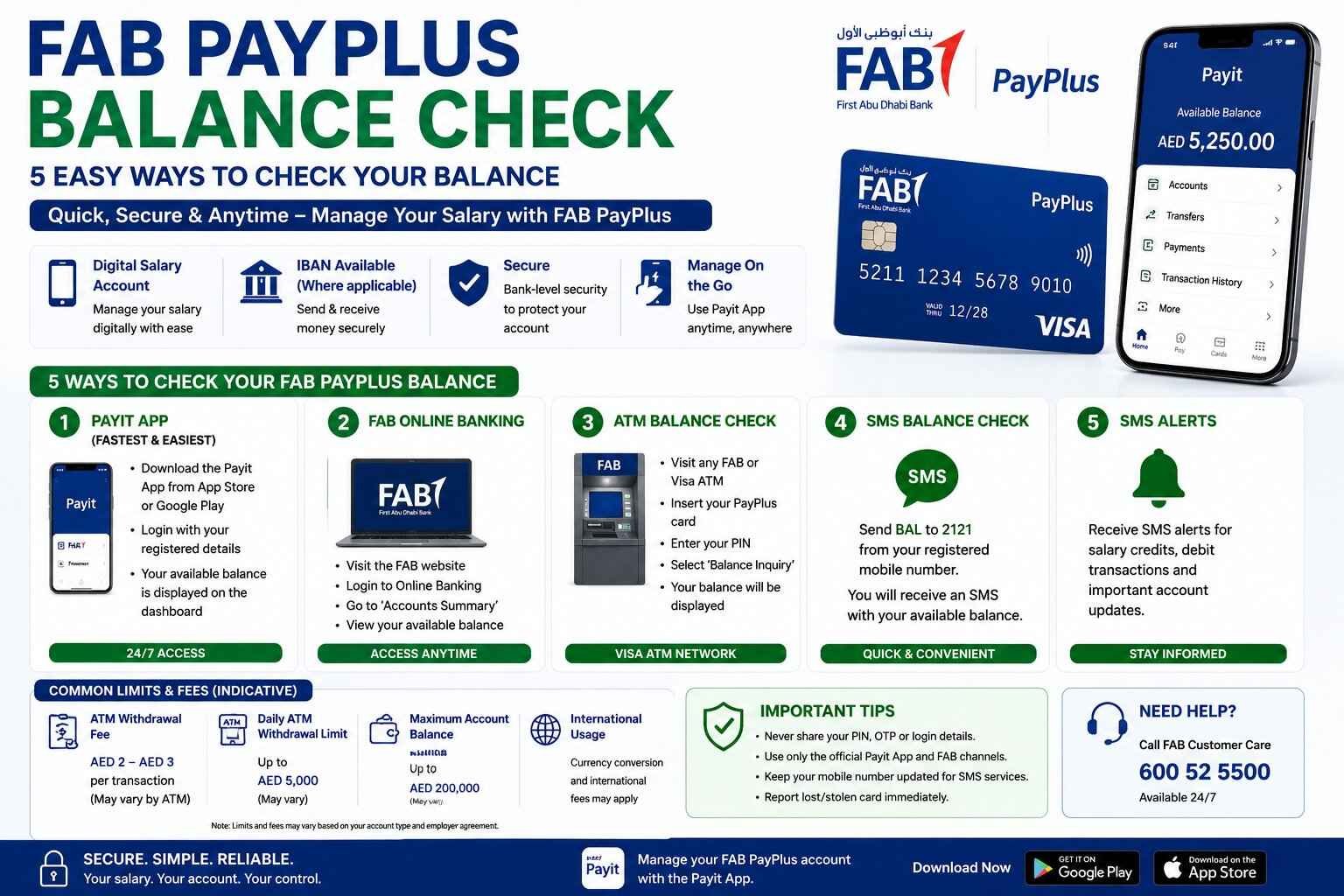
Quick Answer: How to Check Your FAB PayPlus Balance
The easiest way to check your FAB PayPlus balance is through the Payit app, where you can instantly view your available balance, salary deposits, and transaction history.
Other available methods may include:
- Payit App
- FAB digital banking services (where applicable)
- Visa-compatible ATMs
- SMS salary notifications
- Customer support
Using the official Payit app is the fastest and most convenient option for most users.
What Is FAB PayPlus (Payit Plus)?
FAB PayPlus is a digital salary account developed by First Abu Dhabi Bank (FAB) to simplify salary payments for employees in the UAE. The service is managed through the Payit mobile application, allowing users to access their salary anytime without relying solely on a traditional bank branch.
The account is designed for employees whose employers process salaries through the UAE’s Wage Protection System (WPS). Depending on your employer and account type, you may receive additional banking features such as an IBAN, digital transfers, and online payment capabilities.
Unlike a standard prepaid salary card, FAB PayPlus offers a more modern digital banking experience. Users can manage their account directly from their smartphone while enjoying secure access to their salary and financial transactions.
Key Benefits of FAB PayPlus
FAB PayPlus is designed to make salary management simple and convenient.
Some of the main benefits include:
- Receive your monthly salary securely.
- Check your account balance anytime.
- View transaction history.
- Make online purchases.
- Withdraw cash from ATMs.
- Transfer money digitally.
- Manage your account through the Payit app.
- Receive salary and transaction notifications.
These features make FAB PayPlus a practical solution for employees who want greater control over their salary without visiting a branch.
How Does FAB PayPlus Work?
Once your employer enrolls you in the FAB PayPlus salary program, your salary is deposited directly into your digital account every payday.
Instead of carrying cash or relying on paper statements, you can simply open the Payit app to view your available balance, recent transactions, and salary credits.
If your account includes a PayPlus Visa card, you can also:
- Withdraw cash from ATMs.
- Pay at retail stores.
- Shop online.
- Access your salary whenever needed.
Everything is designed to be managed digitally, making everyday banking more convenient.
FAB PayPlus vs Al Ansari PayPlus
Many users assume both PayPlus products are the same because they share a similar name. However, they are designed differently.
| Feature | FAB PayPlus | Al Ansari PayPlus |
|---|---|---|
| Provider | First Abu Dhabi Bank (FAB) | Al Ansari Exchange |
| Product Type | Digital salary account | Prepaid salary card |
| Mobile App | Payit | Al Ansari Exchange App |
| Salary Deposit | Yes | Yes |
| IBAN | Available for eligible accounts | Usually not available |
| Online Transfers | Yes | Limited |
| ATM Withdrawals | Yes | Yes |
| Online Purchases | Yes | Yes |
| Best For | Users who prefer digital banking | Employees using prepaid salary cards |
If you’re unsure which PayPlus product you have, check your welcome message from your employer or the app you were instructed to download.
The Payit app is used for FAB PayPlus, while the Al Ansari Exchange App is used for Al Ansari PayPlus.
Who Can Use FAB PayPlus?
FAB PayPlus is generally available to employees whose companies have enrolled in the salary solution offered by First Abu Dhabi Bank.
Your employer typically manages the registration process, making it easy for eligible employees to receive salaries digitally without opening a traditional bank account.
Depending on your account type and employer’s arrangement, you may also receive access to additional financial services offered through the Payit platform.
Why Choose FAB PayPlus?
FAB PayPlus is becoming increasingly popular because it combines salary management with digital banking convenience.
Instead of depending solely on ATMs or exchange houses, users can monitor their account from virtually anywhere using their smartphone.
Some reasons employees prefer FAB PayPlus include:
- Instant access to salary information.
- Secure mobile account management.
- Easy money transfers.
- Digital transaction history.
- Convenient online payments.
- Reduced need to visit physical branches.
For employees who prefer managing their finances digitally, FAB PayPlus provides a simple and modern solution.
How to Open a FAB PayPlus Account
Unlike a regular bank account, you usually don’t apply for FAB PayPlus on your own. In most cases, your employer registers you for the service as part of their salary payment process under the UAE’s Wage Protection System (WPS).
Once your registration is complete, you’ll receive instructions on how to activate your account and access it through the Payit app.
The exact onboarding process may vary depending on your employer, but it generally follows these steps.
Step 1: Employer Registration
Your employer enrolls you in the FAB PayPlus salary program and submits the required employee information.
Step 2: Download the Payit App
Install the official Payit app from the Google Play Store or Apple App Store.
Always download the app from the official app stores to ensure your account remains secure.
Step 3: Complete Registration
Follow the instructions provided in the app to verify your identity and complete the registration process.
Depending on your account type, you may need to verify your mobile number or complete additional identity verification.
Step 4: Activate Your Account
Once registration is complete, your account will be activated, allowing you to receive salary payments and access available banking services.
Step 5: Start Managing Your Salary
After activation, you can log in anytime to:
- Check your balance
- View salary deposits
- Transfer money
- Review transaction history
- Manage your account securely
FAB PayPlus Balance Check
One of the biggest advantages of FAB PayPlus is that checking your balance is quick and convenient. Whether you’re waiting for your salary to arrive or simply monitoring your spending, there are several official ways to view your available balance.
Method 1: Check Balance Using the Payit App
The easiest and most popular method is through the Payit mobile app.
Simply:
- Open the Payit app.
- Log in securely.
- View your dashboard.
- Your available balance will be displayed immediately.
You can also check:
- Recent salary deposits
- Transaction history
- Transfers
- Payment activity
- Account information
Because it’s available 24/7, the Payit app is the recommended balance-check method.
Method 2: FAB Digital Banking Services
Depending on your account type, eligible users may also access their salary account through FAB’s supported digital banking services.
These services may allow you to:
- View account balances
- Check transaction history
- Monitor account activity
- Access selected banking features
Availability depends on your specific FAB PayPlus account.
Method 3: ATM Balance Inquiry
If you have a FAB PayPlus Visa card, you can check your balance at compatible ATMs.
The process is straightforward:
- Insert your card.
- Enter your PIN.
- Select Balance Inquiry.
- View your available balance.
Many users also withdraw cash immediately after checking their balance.
Please note that certain ATM operators may charge service fees.
Method 4: SMS Notifications
Many FAB PayPlus users receive SMS alerts whenever:
- Salary is credited
- Cash is withdrawn
- Purchases are made
- Important account activities occur
Keeping SMS notifications enabled helps you stay informed without opening the app.
Method 5: Customer Support
If you’re unable to access your account, you can contact FAB customer support for assistance.
Customer service representatives can help with:
- Balance enquiries
- Login issues
- Card activation
- Lost or stolen cards
- General account support
Always verify your identity before discussing account details.
FAB PayPlus Features
FAB PayPlus offers more than just salary deposits. It provides several digital banking features that make everyday financial management easier.
Digital Salary Account
Unlike many prepaid salary cards, FAB PayPlus functions as a digital account designed for everyday use.
Eligible users can receive salary payments directly into their account without needing a traditional current account.
Easy Balance Management
The Payit app allows you to check your available balance at any time.
Instead of waiting for printed statements or visiting an ATM, you can monitor your account instantly from your smartphone.
Salary Notifications
You’ll receive notifications whenever your salary is credited, helping you know exactly when funds become available.
This feature is especially useful for employees who rely on monthly salary payments.
Secure Online Shopping
FAB PayPlus supports online purchases wherever Visa is accepted, making it easier to pay for shopping, subscriptions, food delivery, travel bookings, and utility bills.
Always ensure sufficient funds are available before completing a transaction.
ATM Cash Withdrawals
Users can withdraw cash from compatible ATMs across the UAE and, where supported, internationally.
Withdrawal limits and fees depend on your account type and the ATM operator.
Money Transfers
Depending on your eligibility and account features, FAB PayPlus supports digital money transfers through the Payit platform.
Users may be able to:
- Send money to friends and family.
- Transfer funds between eligible accounts.
- Make local bank transfers.
- Access supported remittance services.
Available transfer options may vary based on your account type.
FAB PayPlus Fees and Limits
The fees associated with FAB PayPlus may differ depending on your employer’s salary package and your account type.
Below is a general overview.
| Service | Typical Information |
|---|---|
| Salary Deposit | Usually free |
| Balance Check via App | Free |
| ATM Balance Inquiry | ATM operator fees may apply |
| ATM Cash Withdrawal | Fees may apply depending on ATM |
| Online Purchases | Generally supported |
| International Transactions | Currency conversion charges may apply |
| Daily Withdrawal Limit | Depends on account type |
| Money Transfers | Fees vary depending on transfer method |
For the latest pricing and account limits, always refer to the official FAB PayPlus terms and conditions.
Can You Transfer Money with FAB PayPlus?
Yes.
One of the biggest advantages of FAB PayPlus over many prepaid salary cards is its support for digital money transfers.
Depending on your account type, you may be able to:
- Send money to another Payit user.
- Transfer funds to eligible UAE bank accounts.
- Use supported remittance services for international transfers.
- Make digital payments directly from your account.
Transfer availability depends on the services enabled for your specific FAB PayPlus account.
What Should You Do If Your FAB PayPlus Card Is Lost or Stolen?
If your FAB PayPlus card is lost, stolen, or you suspect unauthorized activity on your account, take action immediately to protect your funds.
Here are the recommended steps:
- Log in to the Payit app, if possible, and use any available card management features.
- Contact FAB Customer Support immediately to report the lost or stolen card.
- Request that your card be blocked to prevent unauthorized transactions.
- Apply for a replacement card if your account includes a physical PayPlus card.
- Monitor your account regularly for any suspicious activity until the issue is resolved.
Acting quickly can help minimize the risk of unauthorized use and protect your salary.
Security Tips for FAB PayPlus Users
Your FAB PayPlus account provides convenient access to your salary, so it’s important to keep your account secure.
Follow these best practices to protect your money and personal information.
Use Only the Official Payit App
Always download the Payit app from the official Google Play Store or Apple App Store. Avoid installing unofficial apps or software from unknown sources.
Never Share Your Login Details
FAB will never ask for your:
- Password
- PIN
- One-Time Password (OTP)
- Card PIN
- CVV
- Full card number
If anyone requests this information, do not share it.
Enable App Security
Use biometric authentication, fingerprint login, or Face ID if your device supports these features. This adds an extra layer of protection to your account.
Keep Your Mobile Number Updated
Your registered mobile number is used for security alerts, OTP verification, and important account notifications.
If your phone number changes, update it through the official channels as soon as possible.
Monitor Your Transactions
Review your transaction history regularly through the Payit app.
If you notice any unauthorized transactions, report them immediately to FAB.
Frequently Asked Questions
What is FAB PayPlus?
FAB PayPlus is a digital salary account offered by First Abu Dhabi Bank (FAB) that allows eligible employees in the UAE to receive salaries, check balances, transfer money, make purchases, and manage their account through the Payit app.
Is FAB PayPlus a bank account?
FAB PayPlus is a digital salary account that offers many banking-style features. Depending on your account type, you may receive an IBAN and access to additional digital financial services.
How do I check my FAB PayPlus balance?
The easiest way is through the official Payit app. You can also check your balance using supported FAB digital services, compatible ATMs, SMS notifications, or by contacting customer support.
Is FAB PayPlus the same as Al Ansari PayPlus?
No.
Although both are salary solutions used in the UAE, they are different products.
FAB PayPlus is a digital salary account managed through the Payit app, while Al Ansari PayPlus is a prepaid salary card issued by Al Ansari Exchange.
Can I use FAB PayPlus for online shopping?
Yes.
You can use your FAB PayPlus card for online purchases at merchants that accept Visa, provided online transactions are enabled and you have sufficient available balance.
Can I withdraw cash from ATMs?
Yes.
You can withdraw cash from compatible ATMs using your FAB PayPlus card. Applicable fees and withdrawal limits depend on your account type and the ATM operator.
Can I transfer money from FAB PayPlus?
Yes.
Eligible users can transfer money using the Payit platform. Available transfer options depend on the features enabled for your account.
What should I do if I forget my Payit login password?
Use the password recovery option in the Payit app or contact FAB Customer Support for assistance. Never share your login credentials with anyone claiming to help recover your account.
FAB PayPlus vs Traditional Salary Accounts
Many employees wonder whether FAB PayPlus can replace a traditional bank account.
For everyday salary management, FAB PayPlus provides many of the features users expect, including digital access, online payments, ATM withdrawals, and money transfers. However, the services available may vary depending on your employer’s salary program and your account type.
If you require additional banking products such as loans, cheque books, or investment services, you may need a separate traditional bank account.
For most employees, though, FAB PayPlus offers a simple and convenient way to receive and manage their salary digitally.
Related Guides
If you’re looking for more information about PayPlus salary solutions in the UAE, you may also find these guides helpful:
- PayPlus Card: Complete Guide to Balance Check, Online Access & Al Ansari vs FAB PayPlus
- Al Ansari PayPlus Card: Complete Guide to Activation, Balance Check & App
These articles explain the differences between the two PayPlus products and provide detailed instructions for balance checks, account management, and troubleshooting.
Conclusion
FAB PayPlus (Payit Plus) is a convenient digital salary solution designed to make salary management easier for employees in the UAE. With features such as instant balance checks, salary notifications, online shopping, ATM withdrawals, digital transfers, and secure account management through the Payit app, it offers a modern alternative to traditional salary payment methods.
Whether you’re checking your available balance, transferring money, or monitoring your monthly salary, using the official Payit app provides the fastest and most secure experience. Understanding your account features, fees, and security practices will help you make the most of your FAB PayPlus account.
If you’re unsure whether you have FAB PayPlus or an Al Ansari PayPlus Card, read our comparison guide to understand the key differences between the two salary solutions.
At TheUAEWeb.com, we publish practical, up-to-date UAE finance guides to help residents and employees make informed financial decisions with confidence.
Safety Note: TheUAEWeb.com is an independent informational website and is not affiliated with First Abu Dhabi Bank (FAB), Payit, or any UAE government authority. Never share your PIN, OTP, password, CVV, full card number, or account credentials with anyone. Always use the official Payit app, FAB ATMs, customer support, and authorized banking channels to access and manage your FAB PayPlus account securely.

One Comment