FAB Bank Customer Care 2026 (All Contact Numbers)
Whether you’ve lost your debit card, noticed an unauthorized transaction, need help with your credit card, or simply want to speak with a banking representative, knowing the correct FAB Bank customer care contact can save valuable time.
First Abu Dhabi Bank (FAB) is the largest bank in the UAE, serving millions of retail, business, Islamic, and private banking customers. To support this wide customer base, FAB provides multiple customer service channels, including 24/7 phone support, the FAB Mobile App, online banking, WhatsApp assistance, email support, branch services, and an AI-powered virtual assistant.
Instead of searching different websites for various phone numbers, this guide brings together all official FAB customer care numbers, support channels, complaint options, emergency contacts, and banking safety tips in one place.
Whether you’re in Abu Dhabi, Dubai, Sharjah, Ajman, Ras Al Khaimah, Fujairah, Umm Al Quwain, or even outside the UAE, this article will help you find the right FAB support channel for your situation.
Safety Note: Never share your OTP, PIN, CVV, online banking password, or full debit or credit card number with anyone claiming to be from FAB. Bank representatives will never ask for these confidential details over the phone, WhatsApp, SMS, or email.
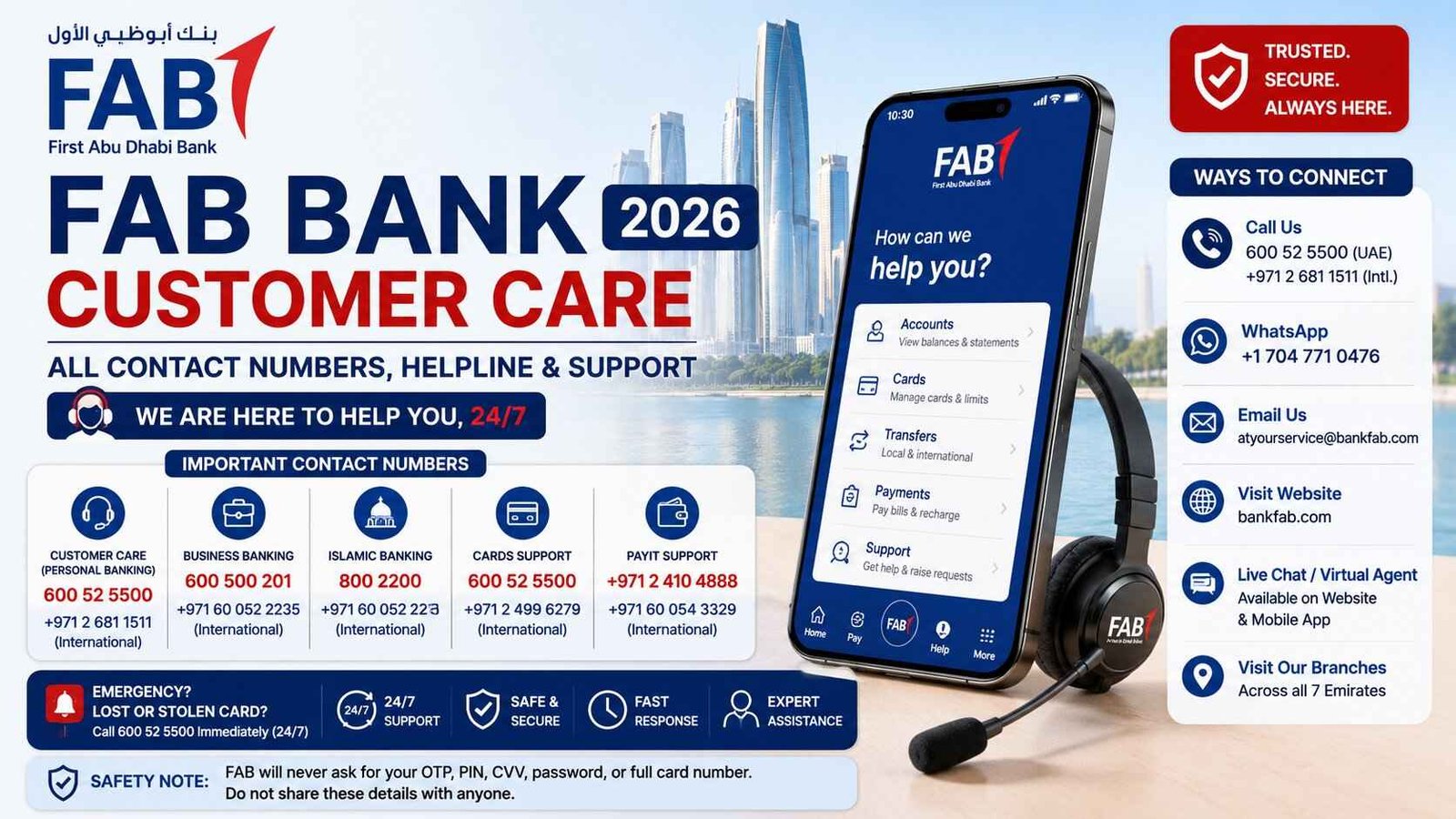
FAB Customer Care Numbers at a Glance
Below are the most commonly used First Abu Dhabi Bank customer service numbers.
| Service | UAE Contact Number | International Contact |
|---|---|---|
| Personal Banking Customer Care | 600 52 5500 | +971 2 681 1511 |
| General Banking Support | 600 52 5500 | +971 2 681 1511 |
| Customer Complaints | 600 52 5500 | +971 2 681 1511 |
| Business Banking | 600 500 201 | +971 60 052 2235 |
| Payit Support | +971 2 410 4888 | +971 60 054 3329 |
| Islamic Banking | 800 2200 | +971 2 499 6111 |
| Merchant (POS) Support | +971 2 499 6599 | +971 2 499 6599 |
For most banking enquiries, 600 52 5500 is the primary customer care number inside the UAE and operates 24 hours a day.
Official FAB Customer Support Channels
FAB offers several ways to get assistance depending on the urgency of your request.
| Support Channel | Best For |
|---|---|
| Customer Care Phone | Urgent banking issues |
| FAB Mobile App | Card management, transfers, secure messaging |
| Online Banking | Account services |
| Official Website | Product information and self-service |
| Email Support | Document submissions and complaints |
| Virtual Assistant | Quick answers to common questions |
| Branches | Identity verification and complex banking requests |
Choosing the right support method can often resolve your issue much faster than waiting in a phone queue.
When Should You Contact FAB Customer Care?
Customers contact FAB for many different banking services every day.
The most common reasons include:
- Lost or stolen debit card
- Credit card blocked
- ATM cash not received
- Failed online transaction
- Mobile banking login issues
- Password reset assistance
- Balance enquiry
- Card activation
- Loan information
- Credit card payment issues
- Updating Emirates ID
- Updating registered mobile number
- Reporting suspicious transactions
- Account opening enquiries
- Complaint registration
- Home finance support
- Business banking assistance
If your issue involves fraud or unauthorized transactions, contact FAB immediately rather than waiting until the next business day.
FAB Customer Care for Personal Banking
Personal banking customers can receive assistance 24 hours a day through the main contact centre.
The support team can help with:
- Current accounts
- Savings accounts
- Salary accounts
- Debit cards
- Credit cards
- Personal loans
- Auto loans
- Home finance
- Online banking
- Mobile banking
- ATM issues
- Transaction enquiries
The customer care team can also verify account information after completing security verification.
FAB Customer Care for Business Banking
Business customers have a dedicated support line that handles commercial banking enquiries.
Business Banking assistance includes:
- Company accounts
- Business debit cards
- Corporate credit cards
- Payroll services
- Trade finance
- Merchant services
- POS terminals
- Business loans
- Cash management
- Company internet banking
Businesses with multiple users can also receive help regarding user permissions and account management.
FAB Islamic Banking Support
Customers using FAB Islamic Banking products have access to dedicated support representatives trained in Sharia-compliant banking products.
Support covers:
- Islamic Current Accounts
- Islamic Savings Accounts
- Murabaha Finance
- Islamic Credit Cards
- Home Finance
- Personal Finance
- Account enquiries
Using the Islamic Banking support line often provides faster assistance than calling the general customer care number.
FAB Elite and Private Banking
Elite and Private Banking customers receive premium customer support with dedicated relationship managers.
Services include:
- Wealth management
- Investments
- Priority banking
- International banking
- Premium credit cards
- Exclusive banking products
Priority customers generally experience shorter waiting times and specialized financial assistance.
Payit Customer Support
Payit is FAB’s digital wallet platform designed for quick payments and money transfers.
Customer support can assist with:
- Wallet registration
- Account verification
- Money transfers
- Card linking
- Wallet limits
- Payment failures
- QR payments
- Mobile wallet security
Users experiencing Payit login problems should contact the dedicated Payit support team rather than the standard banking helpline.
Emergency: Lost or Stolen FAB Card
If your debit or credit card has been lost, stolen, or compromised, take immediate action.
Step 1
Open the FAB Mobile App.
Step 2
Freeze your card immediately using Card Controls.
Step 3
Call FAB Customer Care immediately.
Step 4
Request permanent card blocking if required.
Step 5
Ask for a replacement card.
Step 6
Review your recent transactions carefully.
Step 7
Report any unauthorized payments while speaking with the customer care representative.
Quick reporting significantly increases the chances of preventing fraudulent transactions.
FAB Customer Care Email Support
If your issue isn’t urgent or you need to send supporting documents, email is one of the best ways to contact First Abu Dhabi Bank.
The official FAB customer service email is:
Email support is recommended for:
- Transaction disputes
- Credit card chargeback requests
- Proof of payment submissions
- Account-related enquiries
- Complaint follow-ups
- Document verification
- General banking questions
When sending an email, include only the information necessary to identify your account, such as your name and the last four digits of your account or card number. Never include your full card number, PIN, CVV, password, or OTP.
Response times are typically within 1–2 business days, although complex cases may take longer.
FAB WhatsApp Customer Support
FAB also provides customer assistance through its official WhatsApp channel for general enquiries.
Customers commonly use WhatsApp to ask about:
- Banking products
- Credit cards
- Personal loans
- Branch locations
- Banking services
- General information
For your security, avoid sending sensitive banking information through WhatsApp unless specifically instructed by FAB using official verification procedures.
FAB Mobile App Support
The FAB Mobile App is often the quickest way to resolve everyday banking issues without waiting on hold.
Inside the app, customers can:
- Freeze or unblock cards
- View account balances
- Download account statements
- Update profile information
- Activate debit or credit cards
- Reset passwords
- Contact customer support
- Raise service requests
- Track complaints
Many common banking tasks can now be completed directly within the app, reducing the need to visit a branch or call customer care.
FAB Online Banking Support
FAB Online Banking provides secure access to most banking services through a web browser.
Customers can use Online Banking to:
- View account balances
- Transfer funds
- Pay utility bills
- Manage beneficiaries
- Download statements
- Update personal information
- Apply for selected banking products
If you’re unable to access Online Banking, customer care can assist after verifying your identity.
FAB Virtual Assistant
FAB’s AI-powered Virtual Assistant is available on the official website to answer common banking questions.
It can assist with topics including:
- Account opening
- Loan information
- Credit cards
- Branch locations
- Banking fees
- Product eligibility
- Mobile banking
If the chatbot cannot resolve your issue, it may direct you to the appropriate support team or customer care representative.
FAB Branch Working Hours
Although many banking services are now available digitally, some requests still require visiting a branch.
Typical branch services include:
- Emirates ID updates
- Large cash transactions
- Certified bank statements
- Signature verification
- Account opening assistance
- Safe deposit services
- Complex banking requests
General Branch Timings
| Branch Type | Working Days | Typical Hours |
|---|---|---|
| Standard Branches | Monday to Friday | 8:30 AM – 3:00 PM |
| Mall Branches | Saturday to Thursday | 10:00 AM – 10:00 PM (varies by mall) |
| Contact Centre | 24/7 | Always Available |
Always check your selected branch before visiting, as operating hours may vary during Ramadan and public holidays.
Which FAB Support Channel Should You Use?
Different issues are resolved faster through different support channels.
| Banking Issue | Best Contact Method |
|---|---|
| Lost Debit Card | Phone immediately |
| Credit Card Fraud | Phone immediately |
| ATM Cash Not Dispensed | Customer Care |
| Failed Online Transfer | Customer Care |
| Credit Card Activation | FAB Mobile App |
| Balance Enquiry | Mobile App |
| Statement Download | Mobile App or Online Banking |
| Update Mobile Number | Mobile App or Branch |
| General Information | Website or Virtual Assistant |
| Complaint Registration | Email or Customer Care |
| Business Banking | Business Banking Helpline |
| Merchant POS Issues | Merchant Support |
Choosing the correct support channel often saves considerable waiting time.
Languages Supported by FAB Customer Care
FAB serves customers from many nationalities across the UAE.
Support is generally available in:
- English
- Arabic
Additional language assistance may be available depending on agent availability.
Average Response Time by Support Channel
| Support Method | Typical Response |
|---|---|
| Customer Care Phone | Immediate |
| Mobile App Chat | Within minutes |
| Usually within a few hours | |
| 24–48 business hours | |
| Complaint Investigation | Usually 5–10 business days |
| Branch Visit | Depends on customer traffic |
For urgent banking matters, calling customer care remains the fastest option.
How to File a Complaint with FAB Bank
If your issue has not been resolved through regular customer support, FAB provides a formal complaints process that follows the Central Bank of the UAE’s consumer protection guidelines. Whether your concern is related to a failed transaction, unauthorized debit, loan issue, or service quality, you can officially submit your complaint for review.
Step 1: Contact FAB Customer Care First
Before filing a formal complaint, contact FAB customer support through one of its official channels.
You can:
- Call 600 52 5500 (within UAE)
- Call +971 2 681 1511 (outside UAE)
- Use the Live Chat inside the FAB Mobile App
- Contact the Virtual Assistant on the official FAB website
Many issues such as card disputes, transaction delays, and online banking problems are resolved during the first interaction.
Step 2: Submit an Official Complaint
If the problem remains unresolved, submit a complaint using one of these methods:
- FAB Online Complaint Form
- Email: atyourservice@bankfab.com
- Visit your nearest FAB branch
- Request a complaint ticket through customer care
When submitting a complaint, include:
- Full Name
- Emirates ID (if requested)
- Account or Card Number
- Mobile Number
- Detailed description of the issue
- Supporting documents or screenshots
After submission, FAB provides a Complaint Reference Number that you can use to track progress.
Step 3: Wait for Investigation
Most simple complaints are resolved within a few working days.
For complex cases involving fraud investigations, chargebacks, or loan disputes, FAB may require additional verification before providing a final response.
Keep your complaint reference number safe until the issue has been fully resolved.
Step 4: Escalate to the Central Bank of the UAE
If FAB does not resolve your complaint satisfactorily, you can escalate the matter to the Central Bank of the UAE (CBUAE) through its Consumer Protection platform.
Before escalating, ensure that:
- You have already contacted FAB.
- You have your complaint reference number.
- FAB has been given reasonable time to investigate.
The Central Bank independently reviews banking complaints against licensed UAE banks.
How to Report a Lost or Stolen FAB Card
Losing your debit or credit card can expose your account to unauthorized transactions. If your FAB card is lost, stolen, or suspected of being compromised, act immediately.
Freeze Your Card Using the FAB Mobile App
The fastest option is to temporarily freeze your card.
Open:
FAB Mobile App → Cards → Select Card → Freeze Card
This blocks new card transactions instantly while you decide your next step.
Call FAB Customer Care Immediately
After freezing the card, contact customer care to permanently block it.
Inside UAE
600 52 5500
Outside UAE
+971 2 681 1511
The support team is available 24 hours a day.
Review Recent Transactions
Ask the customer service representative to review your latest card transactions.
If you notice unauthorized purchases, report them immediately so FAB can begin a fraud investigation.
Request a Replacement Card
Once the card has been blocked, request a replacement.
Replacement cards are generally delivered within several working days depending on your location in the UAE.
How to Update Your Mobile Number or Email in FAB
Keeping your contact details updated is important because OTP verification, security alerts, and banking notifications are sent to your registered phone number and email.
Through FAB Mobile App
- Log into the app.
- Open the Menu.
- Select Profile Settings.
- Update your mobile number or email address.
- Verify using OTP.
Through Online Banking
Log into FAB Online Banking.
Navigate to:
Services → Personal Information → Update Contact Details
By Visiting a Branch
If online verification fails, visit your nearest FAB branch with your Emirates ID to update your information.
Security Tips When Contacting FAB Customer Care
Cybercriminals frequently impersonate UAE banks through phone calls, SMS messages, WhatsApp, and fake websites. Following these security practices helps protect your account.
Always remember:
- FAB never asks for your ATM PIN.
- Never share your OTP with anyone.
- Never disclose your CVV or online banking password.
- Ignore suspicious SMS links claiming your account will be blocked.
- Verify every call by contacting FAB through its official customer care number.
- Use only the official FAB website and Mobile App.
If you believe someone has attempted to scam you, report the incident immediately through FAB Customer Care.
People Also Ask
What is the FAB Bank customer care number?
The main FAB customer care number inside the UAE is 600 52 5500. Customers calling from outside the UAE can contact +971 2 681 1511.
Is FAB customer service available 24/7?
Yes. FAB provides 24-hour customer support through its phone banking service, mobile app, and digital banking channels.
What is the FAB customer care email address?
Customers can contact FAB by email at atyourservice@bankfab.com for non-urgent banking inquiries and complaint submissions.
Does FAB have WhatsApp customer support?
Yes. FAB offers customer support through its official WhatsApp service for selected banking assistance and general inquiries.
How do I contact FAB from outside the UAE?
Call +971 2 681 1511 or use the FAB Mobile App, Online Banking, or official website to reach customer support while overseas.
How do I report a lost FAB debit or credit card?
Immediately freeze your card using the FAB Mobile App and call 600 52 5500 (or +971 2 681 1511 from abroad) to permanently block the card and request a replacement.
How long does FAB take to respond to complaints?
Simple complaints are often resolved quickly, while more complex banking disputes may take several business days depending on the investigation required.
Can I chat with FAB customer support online?
Yes. Customers can use the Live Chat feature within the FAB Mobile App or the Virtual Assistant available on the official FAB website.
Why is FAB customer care busy?
Call volumes are usually highest after salary days, public holidays, and during system maintenance. If phone lines are busy, you can use the FAB Mobile App, online chat, or email support.
Is the FAB Mobile App customer support available all day?
Yes. The app offers self-service features around the clock, while live support availability may vary depending on the service requested.
Final Thoughts
Having the correct FAB Bank customer care contact details can save valuable time when dealing with banking issues. Whether you need to block a lost card, check your account, report fraud, submit a complaint, or contact business banking support, FAB offers multiple official communication channels including phone, email, WhatsApp, online banking, and its mobile app.
Before contacting support, have your account details ready and use only official FAB channels to protect yourself from scams. For more UAE banking guides, customer support information, and financial resources, continue exploring TheUAEWeb.com.